What's inside
Form content
(Rev. November 2022)
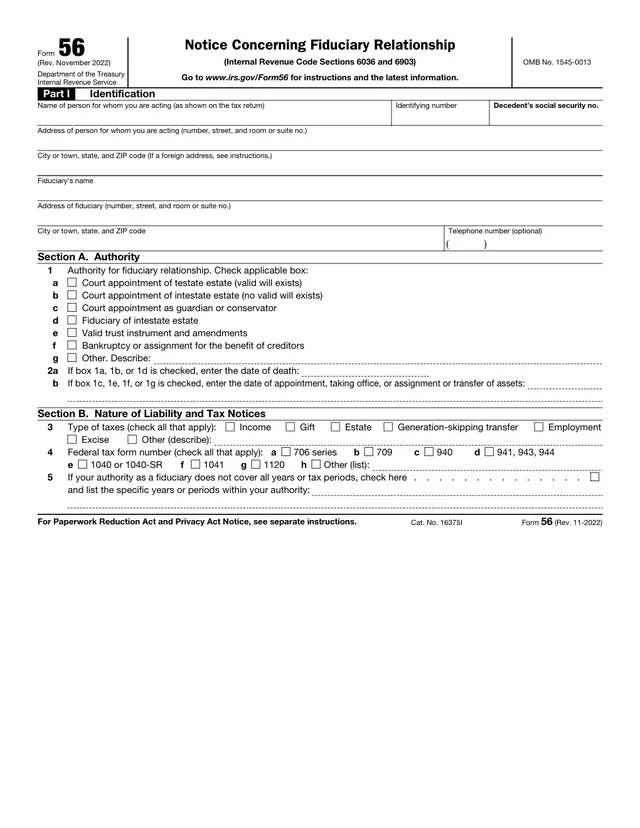
Notice Concerning Fiduciary Relationship
(Internal Revenue Code Sections 6036 and 6903)
Go to www.irs.gov/Form56 for instructions and the latest information.
Part I
Identification
Name of person for whom you are acting (as shown on the tax return)
Identifying number
Decedent’s social security no.
Address of person for whom you are acting (number, street, and room or suite no.)
City or town, state, and ZIP code (If a foreign address, see instructions.)
Fiduciary’s name
Address of fiduciary (number, street, and room or suite no.)
City or town, state, and ZIP code
Telephone number (optional)
(
)
Section A. Authority
1
Authority for fiduciary relationship. Check applicable box:
a
Court appointment of testate estate (valid will exists) b
Court appointment of intestate estate (no valid will exists) c
Court appointment as guardian or conservator d
Fiduciary of intestate estate e
Valid trust instrument and amendments f
Bankruptcy or assignment for the benefit of creditors g
Other. Describe:
2 a If box 1a, 1b, or 1d is checked, enter the date of death:
b If box 1c, 1e, 1f, or 1g is checked, enter the date of appointment, taking office, or assignment or transfer of asset
How to fill it
Fill or edit this form in MePDF
- Preview page 1 to confirm the form name and revision.
- Select Fill form to answer the form one page at a time.
- Type an answer for each field; checkboxes and choices use the form’s own options.
- Preview the finished pages, then download the flattened PDF.
- The downloaded copy is image-only, so it cannot be edited as a form again.
Fill only the fields that apply and do not change clauses you were not asked to change. The editor keeps the original layout while you fill the existing fields.