What's inside
Form content
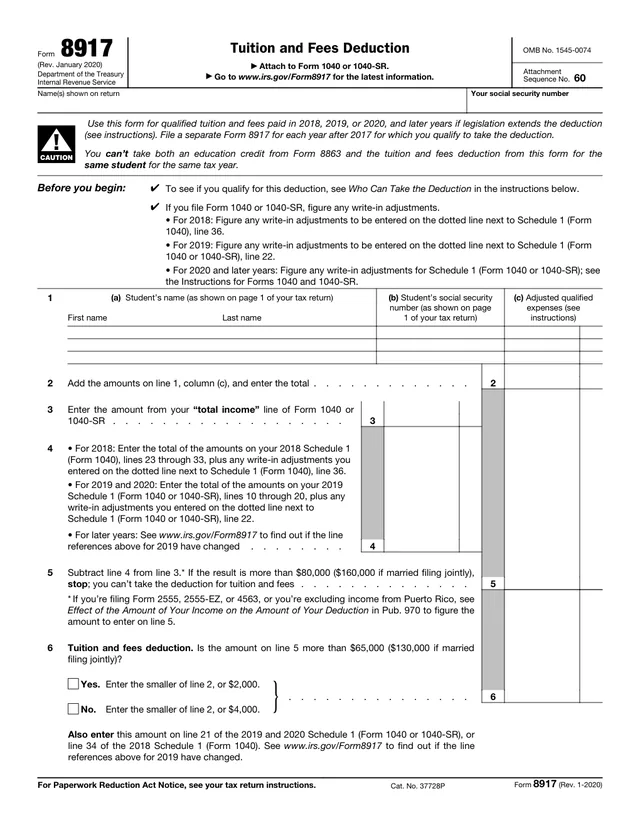
(Rev. January 2020)
Tuition and Fees Deduction
▶ Attach to Form 1040 or 1040-SR.
▶ Go to www.irs.gov/Form8917 for the latest information.
Attachment
Sequence No. 60
Name(s) shown on return
Your social security number
▲
!
CAUTION
Use this form for qualified tuition and fees paid in 2018, 2019, or 2020, and later years if legislation extends the deduction
(see instructions). File a separate Form 8917 for each year after 2017 for which you qualify to take the deduction.
You can’t take both an education credit from Form 8863 and the tuition and fees deduction from this form for the same student for the same tax year.
Before you begin:
✔To see if you qualify for this deduction, see Who Can Take the Deduction in the instructions below.
✔If you file Form 1040 or 1040-SR, figure any write-in adjustments.
• For 2018: Figure any write-in adjustments to be entered on the dotted line next to Schedule 1 (Form
1040), line 36.
• For 2019: Figure any write-in adjustments to be entered on the dotted line next to Schedule 1 (Form
1040 or 1040-SR), line 22.
• For 2020 and later years: Figure any write-in adjustments for Schedule 1 (Form 1040 or 1040-SR); see the Instructions for Forms 1040 and 1040-S
How to fill it
Fill or edit this form in MePDF
- Preview page 1 to confirm the form name and revision.
- Select Fill form to answer the form one page at a time.
- Type an answer for each field; checkboxes and choices use the form’s own options.
- Preview the finished pages, then download the flattened PDF.
- The downloaded copy is image-only, so it cannot be edited as a form again.
Check the school's name and the term before signing. The editor keeps the original layout while you fill the existing fields.