What's inside
Form content
(Form 990)
Political Campaign and Lobbying Activities
For Organizations Exempt From Income Tax Under Section 501(c) and Section 527
Complete if the organization is described below. Attach to Form 990 or Form 990-EZ.
Go to www.irs.gov/Form990 for instructions and the latest information.
2025
Open to Public
Inspection
If the organization answered “Yes” on Form 990, Part IV, line 3, or Form 990-EZ, Part V, line 46 (Political Campaign Activities), then:
• Section 501(c)(3) organizations: Complete Parts I-A and I-B. Do not complete Part I-C.
• Section 501(c) (other than section 501(c)(3)) organizations: Complete Parts I-A and I-C below. Do not complete Part I-B.
• Section 527 organizations: Complete Part I-A only.
If the organization answered “Yes” on Form 990, Part IV, line 4, or Form 990-EZ, Part VI, line 47 (Lobbying Activities), then:
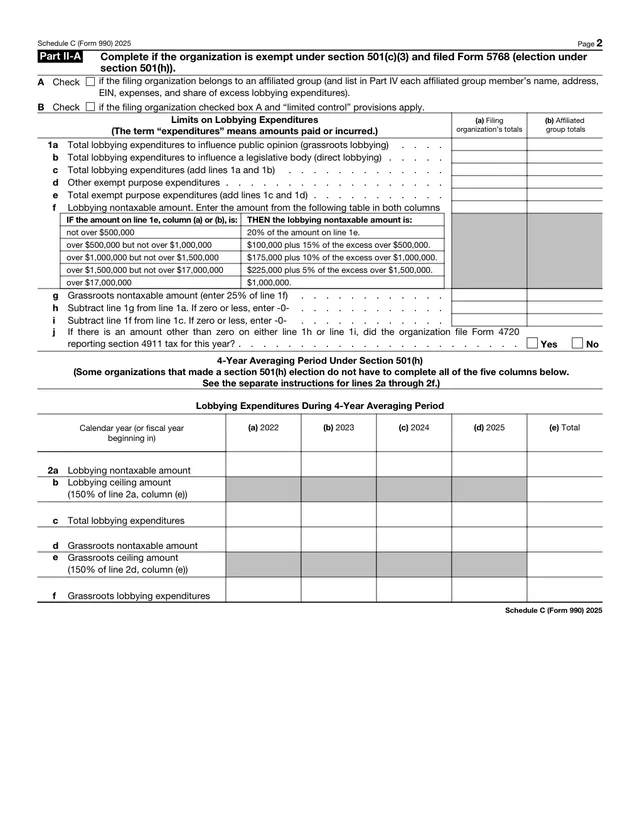
• Section 501(c)(3) organizations that have filed Form 5768 (election under section 501(h)): Complete Part II-A. Do not complete Part II-B.
• Section 501(c)(3) organizations that have NOT filed Form 5768 (election under section 501(h)): Complete Part II-B. Do not complete Part II-A.
If the organization answered “Yes” on Form 990, Part IV, line 5 (Proxy
How to fill it
Fill or edit this form in MePDF
- Preview page 2 to confirm the form name and revision.
- Select Fill form to answer the form one page at a time.
- Type an answer for each field; checkboxes and choices use the form’s own options.
- Preview the finished pages, then download the flattened PDF.
- The downloaded copy is image-only, so it cannot be edited as a form again.
Fill only the fields that apply and do not change clauses you were not asked to change. The editor keeps the original layout while you fill the existing fields.