What's inside
Form content
(Form 990)
(Rev. December 2024)
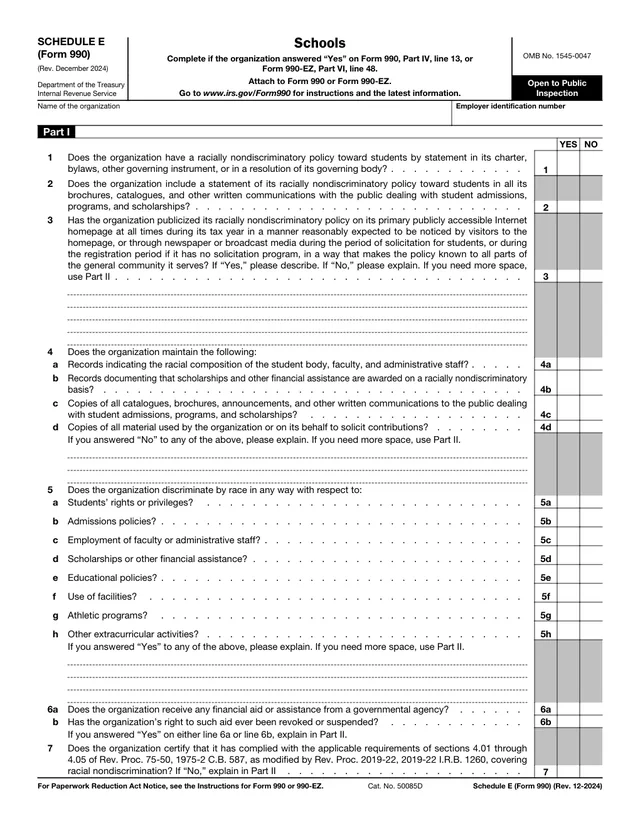
Schools
Complete if the organization answered “Yes” on Form 990, Part IV, line 13, or
Form 990-EZ, Part VI, line 48.
Attach to Form 990 or Form 990-EZ.
Go to www.irs.gov/Form990 for instructions and the latest information.
Open to Public
Inspection
Name of the organization
Employer identification number
Part I
YES NO
1
Does the organization have a racially nondiscriminatory policy toward students by statement in its charter, bylaws, other governing instrument, or in a resolution of its governing body? .
.
.
.
.
.
.
.
.
.
.
.
1
2
Does the organization include a statement of its racially nondiscriminatory policy toward students in all its brochures, catalogues, and other written communications with the public dealing with student admissions, programs, and scholarships? .
.
.
.
.
.
.
.
.
.
.
.
.
.
.
.
.
.
.
.
.
.
.
.
.
.
.
.
.
2
3
Has the organization publicized its racially nondiscriminatory policy on its primary publicly accessible Internet homepage at all times during its tax year in a manner reasonably expected to be noticed by visitors to the homepage, or through newspaper or broadcast media during the period of solicitation for students, or during
How to fill it
Fill or edit this form in MePDF
- Preview page 1 to confirm the form name and revision.
- Select Fill form to answer the form one page at a time.
- Type an answer for each field; checkboxes and choices use the form’s own options.
- Preview the finished pages, then download the flattened PDF.
- The downloaded copy is image-only, so it cannot be edited as a form again.
Check the school's name and the term before signing. The editor keeps the original layout while you fill the existing fields.