What's inside
Form content
APD AEM v1.00ES
PREVIOUS EDITIONS ARE OBSOLETE.
DA FORM 12, JUN 2021
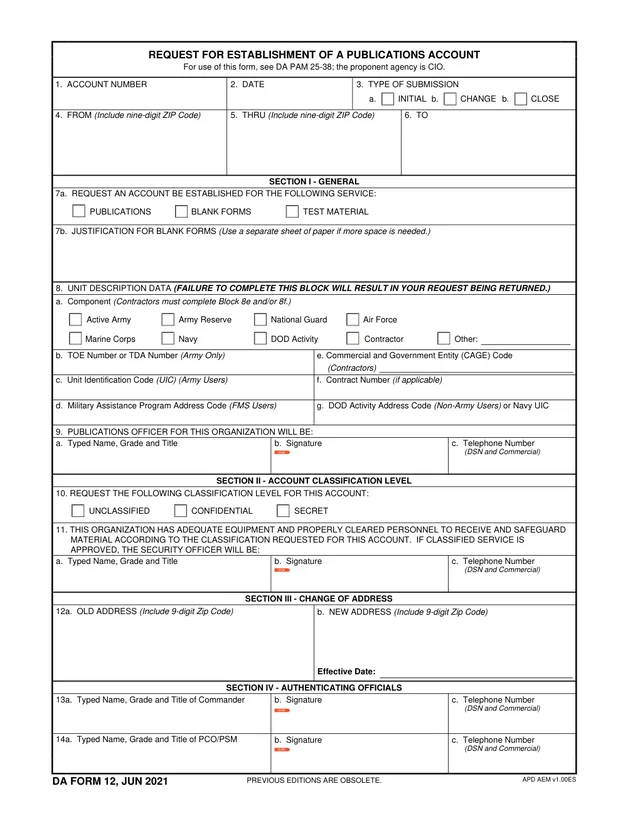
REQUEST FOR ESTABLISHMENT OF A PUBLICATIONS ACCOUNT
For use of this form, see DA PAM 25-38; the proponent agency is CIO.
1. ACCOUNT NUMBER
2. DATE
3. TYPE OF SUBMISSION a.
INITIAL b.
b.
CHANGE
CLOSE
4. FROM (Include nine-digit ZIP Code)
5. THRU (Include nine-digit ZIP Code)
6. TO
SECTION I - GENERAL
7a. REQUEST AN ACCOUNT BE ESTABLISHED FOR THE FOLLOWING SERVICE:
PUBLICATIONS
BLANK FORMS
TEST MATERIAL
7b. JUSTIFICATION FOR BLANK FORMS (Use a separate sheet of paper if more space is needed.)
8. UNIT DESCRIPTION DATA (FAILURE TO COMPLETE THIS BLOCK WILL RESULT IN YOUR REQUEST BEING RETURNED.) a. Component (Contractors must complete Block 8e and/or 8f.)
Active Army
Army Reserve
National Guard
Air Force
Navy
DOD Activity
Marine Corps
Contractor
Other:
b. TOE Number or TDA Number (Army Only) e. Commercial and Government Entity (CAGE) Code
(Contractors) c. Unit Identification Code (UIC) (Army Users) f. Contract Number (if applicable) d. Military Assistance Program Address Code (FMS Users) g. DOD Activity Address Code (Non-Army Users) or Navy UIC
9. PUBLICATIONS OFFICER FOR THIS ORGANIZATION WILL BE:
a. Typed Name, Grade
How to fill it
Fill or edit this form in MePDF
- Preview page 1 to confirm the form name and revision.
- Select Fill form to answer the form one page at a time.
- Type an answer for each field; checkboxes and choices use the form’s own options.
- Preview the finished pages, then download the flattened PDF.
- The downloaded copy is image-only, so it cannot be edited as a form again.
Use the service member's full legal name and current unit details. The editor keeps the original layout while you fill the existing fields.