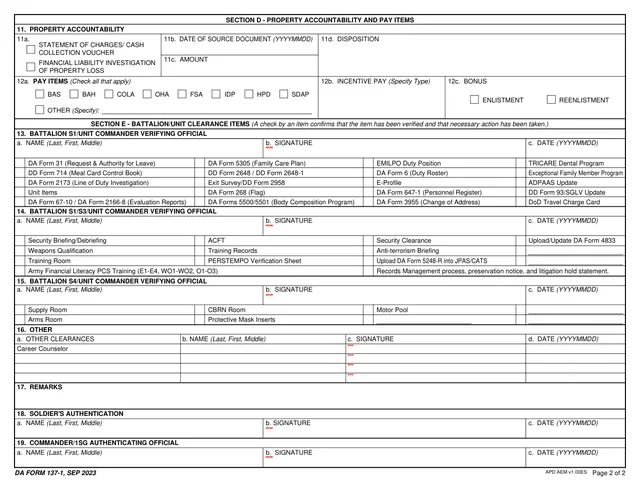
What's inside
Form content
PCS
ETS
RETIREMENT
OTHER (Specify):
COMPLETION DATE
(YYYYMMDD)
PUNISHMENT d.
e.
SOURCE DOCUMENT DATE
(YYYYMMDD) c.
b.
EFFECTIVE DATE
(YYYYMMDD)
10.
TYPE OF ACTION
TYPE OF ABSENCE
9.
a.
d.
ADVERSE ACTIONS
LOG NUMBER OR ORDER NUMBER
(When Applicable)
DUTY STATUS c.
b.
1. NAME (Last, First, Middle)
2. RANK
3. ORDERS NO.
4. GAINING UNIT
5. LOSING UNIT
7. REASON FOR CLEARING
SECTION B - DUTY STATUS
SECTION C - ADVERSE ACTIONS a.
RETURN DATE
(YYYYMMDD)
START DATE
(YYYYMMDD)
SECTION A - PERSONNEL DATA
(To be completed by the commander, BNS1, out-processing center, or appointed official)
6. DATE OF ORDERS (YYYYMMDD)
8. DEPARTURE DATE (YYYYMMDD)
Indicate all leave, TDY, hospitalization, field duty, lost time, AWOL, and confinement within 60 days prior to issuance of the clearance forms.
A ll that have occurred within
60 days prior to issuance of clearance forms. Include
UCMJ actions, courts martial, administrative reductions, and administrative discharges.
PRINCIPAL PURPOSE:
ROUTINE USES:
DISCLOSURE:
UNIT CLEARANCE RECORD
For use of this form, see AR 600-8-101; the proponent agency is DCS, G-1.
PRIVACY ACT STATEMENT
To ensure Soldier readiness before PCS. To complete clearance verification
How to fill it
Fill or edit this form in MePDF
- Preview page 2 to confirm the form name and revision.
- Select Fill form to answer the form one page at a time.
- Type an answer for each field; checkboxes and choices use the form’s own options.
- Preview the finished pages, then download the flattened PDF.
- The downloaded copy is image-only, so it cannot be edited as a form again.
Use the service member's full legal name and current unit details. The editor keeps the original layout while you fill the existing fields.