What's inside
Form content
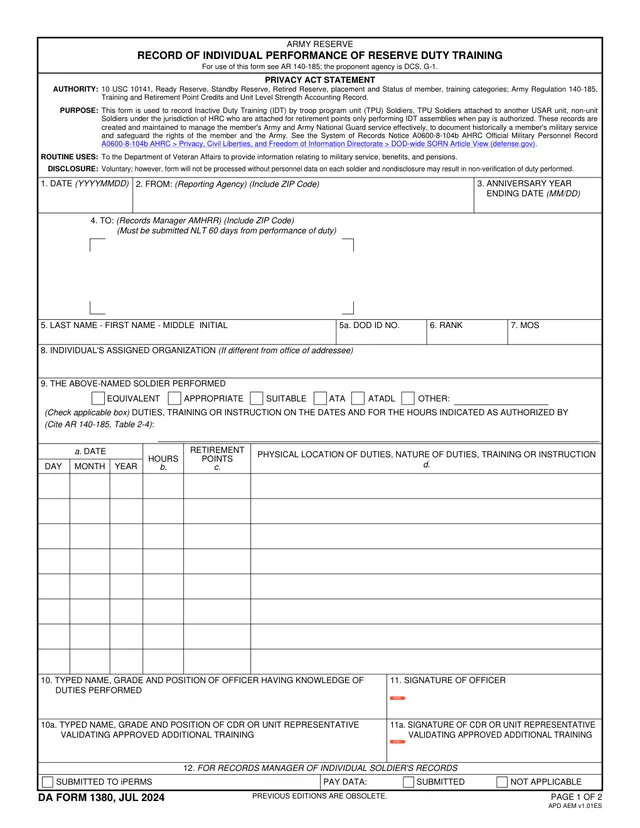
4. TO: (Records Manager AMHRR) (Include ZIP Code)
(Must be submitted NLT 60 days from performance of duty)
9. THE ABOVE-NAMED SOLDIER PERFORMED
5. LAST NAME - FIRST NAME - MIDDLE INITIAL
6. RANK
7. MOS
8. INDIVIDUAL'S ASSIGNED ORGANIZATION (If different from office of addressee)
5a. DOD ID NO.
ATA
ATADL
EQUIVALENT
APPROPRIATE
SUITABLE
OTHER:
DAY
MONTH
YEAR
HOURS b.
RETIREMENT
POINTS c.
PHYSICAL LOCATION OF DUTIES, NATURE OF DUTIES, TRAINING OR INSTRUCTION d.
(Cite AR 140-185, Table 2-4):
a. DATE
(Check applicable box) DUTIES, TRAINING OR INSTRUCTION ON THE DATES AND FOR THE HOURS INDICATED AS AUTHORIZED BY
11. SIGNATURE OF OFFICER
11a. SIGNATURE OF CDR OR UNIT REPRESENTATIVE
VALIDATING APPROVED ADDITIONAL TRAINING
10. TYPED NAME, GRADE AND POSITION OF OFFICER HAVING KNOWLEDGE OF
DUTIES PERFORMED
10a. TYPED NAME, GRADE AND POSITION OF CDR OR UNIT REPRESENTATIVE
VALIDATING APPROVED ADDITIONAL TRAINING
1. DATE (YYYYMMDD)
2. FROM: (Reporting Agency) (Include ZIP Code)
3. ANNIVERSARY YEAR
ENDING DATE (MM/DD)
SUBMITTED TO iPERMS
PAY DATA:
SUBMITTED
NOT APPLICABLE
DA FORM 1380, JUL 2024
PREVIOUS EDITIONS ARE OBSOLETE.
APD AEM v1.01ES
ARMY RESERVE
RECORD OF INDIVIDUAL PERFORMANCE OF RESERV
How to fill it
Fill or edit this form in MePDF
- Preview page 1 to confirm the form name and revision.
- Select Fill form to answer the form one page at a time.
- Type an answer for each field; checkboxes and choices use the form’s own options.
- Preview the finished pages, then download the flattened PDF.
- The downloaded copy is image-only, so it cannot be edited as a form again.
Use the service member's full legal name and current unit details. The editor keeps the original layout while you fill the existing fields.