What's inside
Form content
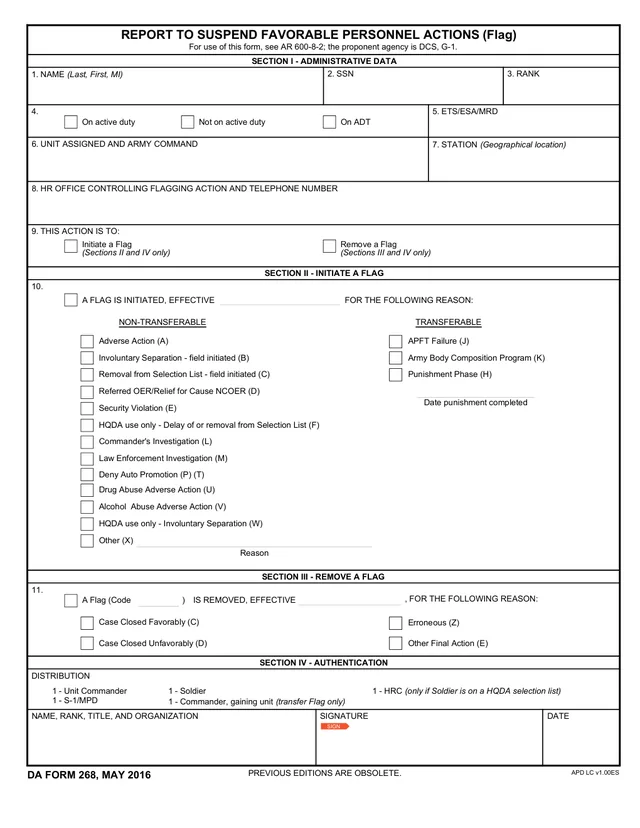
REPORT TO SUSPEND FAVORABLE PERSONNEL ACTIONS (Flag)
SECTION I - ADMINISTRATIVE DATA
4.
On active duty
Not on active duty
On ADT
9. THIS ACTION IS TO:
Initiate a Flag
(Sections II and IV only)
Remove a Flag
(Sections III and IV only)
SECTION II - INITIATE A FLAG
10.
A FLAG IS INITIATED, EFFECTIVE
FOR THE FOLLOWING REASON:
Adverse Action (A)
Involuntary Separation - field initiated (B)
Removal from Selection List - field initiated (C)
Referred OER/Relief for Cause NCOER (D)
Security Violation (E)
HQDA use only - Delay of or removal from Selection List (F)
APFT Failure (J)
Army Body Composition Program (K)
NON-TRANSFERABLE
TRANSFERABLE
Commander's Investigation (L)
Law Enforcement Investigation (M)
Deny Auto Promotion (P) (T)
Drug Abuse Adverse Action (U)
SECTION III - REMOVE A FLAG
11.
A Flag (Code
, FOR THE FOLLOWING REASON:
Case Closed Favorably (C)
Case Closed Unfavorably (D)
Erroneous (Z)
Other Final Action (E)
SECTION IV - AUTHENTICATION
DISTRIBUTION
1 - Unit Commander
1 - S-1/MPD
1 - Soldier
SIGNATURE
DA FORM 268, MAY 2016
PREVIOUS EDITIONS ARE OBSOLETE.
APD LC v1.00ES
2. SSN
3. RANK
5. ETS/ESA/MRD
6. UNIT ASSIGNED AND ARMY COMMAND
8. HR OFFICE CONTROLLING FLAGGING ACTION AND
How to fill it
Fill or edit this form in MePDF
- Preview page 1 to confirm the form name and revision.
- Select Fill form to answer the form one page at a time.
- Type an answer for each field; checkboxes and choices use the form’s own options.
- Preview the finished pages, then download the flattened PDF.
- The downloaded copy is image-only, so it cannot be edited as a form again.
Use the service member's full legal name and current unit details. The editor keeps the original layout while you fill the existing fields.