What's inside
Form content
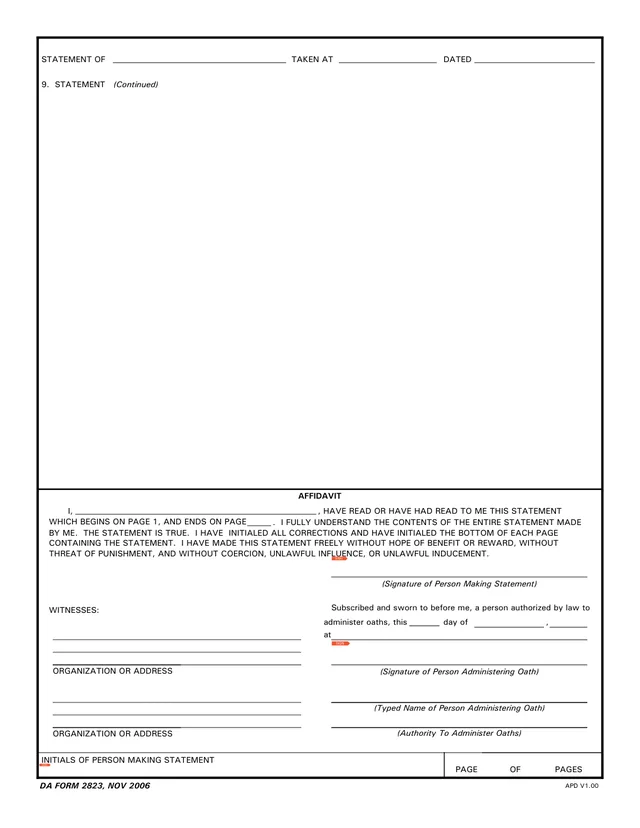
THE BOTTOM OF EACH ADDITIONAL PAGE MUST BEAR THE INITIALS OF THE PERSON MAKING THE STATEMENT, AND PAGE NUMBER
MUST BE INDICATED.
ADDITIONAL PAGES MUST CONTAIN THE HEADING "STATEMENT OF
SWORN STATEMENT
For use of this form, see AR 190-45; the proponent agency is PMG.
PAGE 1 OF
3. TIME
6. SSN
2. DATE (YYYYMMDD)
I,
DA FORM 2823, DEC 1998, IS OBSOLETE
8. ORGANIZATION OR ADDRESS
10. EXHIBIT
11. INITIALS OF PERSON MAKING STATEMENT
DA FORM 2823, NOV 2006
1. LOCATION
5. LAST NAME, FIRST NAME, MIDDLE NAME
4. FILE NUMBER
7. GRADE/STATUS
, WANT TO MAKE THE FOLLOWING STATEMENT UNDER OATH:
PAGES
DATED
TAKEN AT
9.
PRIVACY ACT STATEMENT
AUTHORITY:
PRINCIPAL PURPOSE:
ROUTINE USES:
DISCLOSURE:
Title 10, USC Section 301; Title 5, USC Section 2951; E.O. 9397 Social Security Number (SSN).
To document potential criminal activity involving the U.S. Army, and to allow Army officials to maintain discipline, law and order through investigation of complaints and incidents.
Information provided may be further disclosed to federal, state, local, and foreign government law enforcement agencies, prosecutors, courts, child protective services, victims, witnesses, the Department of Veterans Affairs, and the Offic
How to fill it
Fill or edit this form in MePDF
- Preview page 3 to confirm the form name and revision.
- Select Fill form to answer the form one page at a time.
- Type an answer for each field; checkboxes and choices use the form’s own options.
- Preview the finished pages, then download the flattened PDF.
- The downloaded copy is image-only, so it cannot be edited as a form again.
Use the service member's full legal name and current unit details. The editor keeps the original layout while you fill the existing fields.