What's inside
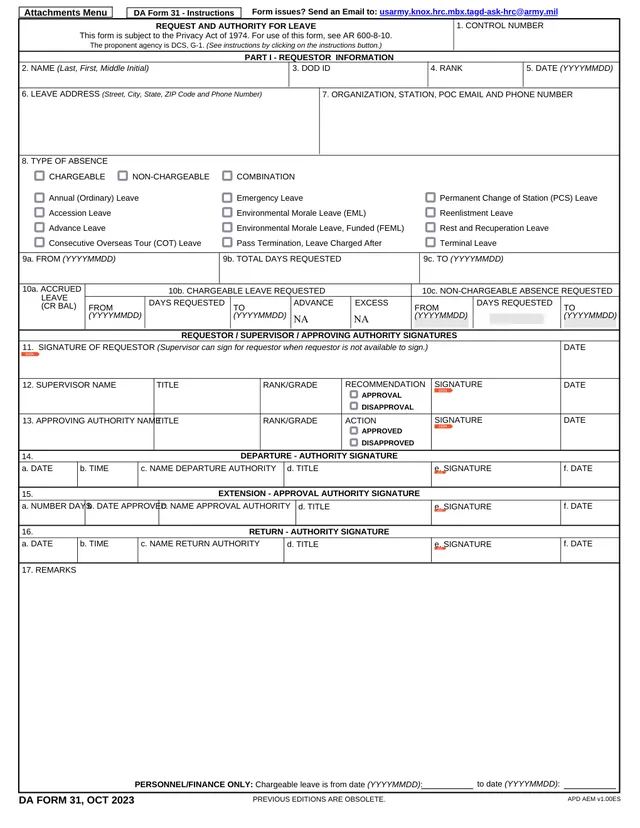
Form content
PREVIOUS EDITIONS ARE OBSOLETE.
DA FORM 31, OCT 2023
APD AEM v1.00ES
Attachments Menu
Form issues? Send an Email to: [email protected]
DA Form 31 - Instructions
4. RANK
PART I - REQUESTOR INFORMATION
1. CONTROL NUMBER
3. DOD ID
2. NAME (Last, First, Middle Initial)
5. DATE (YYYYMMDD)
7. ORGANIZATION, STATION, POC EMAIL AND PHONE NUMBER
6. LEAVE ADDRESS (Street, City, State, ZIP Code and Phone Number)
CHARGEABLE
Annual (Ordinary) Leave
Accession Leave
Advance Leave
Consecutive Overseas Tour (COT) Leave
Emergency Leave
Environmental Morale Leave (EML)
Environmental Morale Leave, Funded (FEML)
Pass Termination, Leave Charged After
Permanent Change of Station (PCS) Leave
Reenlistment Leave
Rest and Recuperation Leave
Terminal Leave
8. TYPE OF ABSENCE
NON-CHARGEABLE
COMBINATION
9a. FROM (YYYYMMDD)
9b. TOTAL DAYS REQUESTED
9c. TO (YYYYMMDD)
DAYS REQUESTED
TO
(YYYYMMDD)
10a. ACCRUED
LEAVE
(CR BAL)
10b. CHARGEABLE LEAVE REQUESTED
10c. NON-CHARGEABLE ABSENCE REQUESTED
TO
(YYYYMMDD)
FROM
(YYYYMMDD)
ADVANCE
EXCESS
NA
DAYS REQUESTED
NA
FROM
(YYYYMMDD)
REQUESTOR / SUPERVISOR / APPROVING AUTHORITY SIGNATURES
11. SIGNATURE OF REQUESTOR (Supervisor can sign for requestor wh
How to fill it
Fill or edit this form in MePDF
- Preview page 1 to confirm the form name and revision.
- Select Fill form to answer the form one page at a time.
- Type an answer for each field; checkboxes and choices use the form’s own options.
- Preview the finished pages, then download the flattened PDF.
- The downloaded copy is image-only, so it cannot be edited as a form again.
Use the service member's full legal name and current unit details. The editor keeps the original layout while you fill the existing fields.