What's inside
Form content
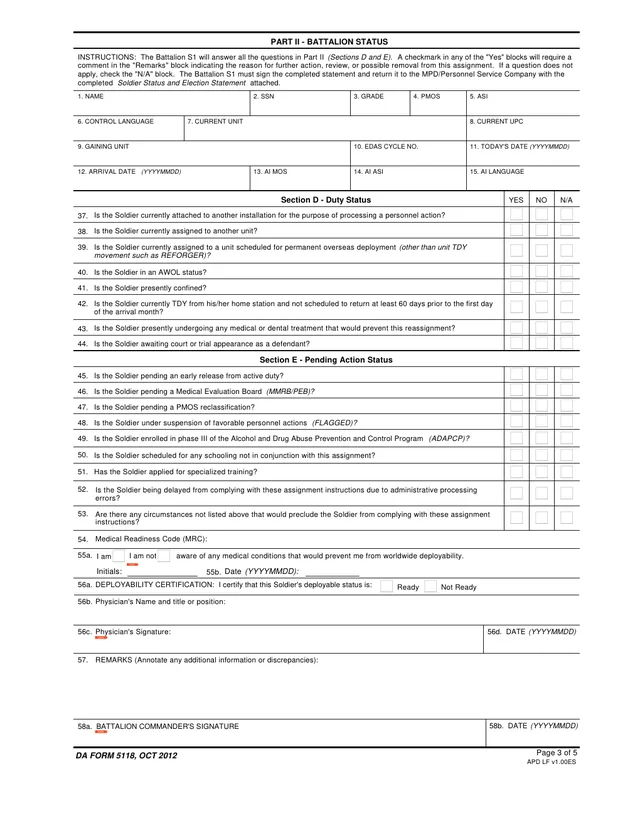
1. NAME
6. CONTROL LANGUAGE
2. SSN
3. GRADE
4. PMOS
5. ASI
7. CURRENT UNIT
8. CURRENT UPC
9. GAINING UNIT
12. ARRIVAL DATE (YYYYMMDD)
11. TODAY'S DATE (YYYYMMDD)
15. AI LANGUAGE
10. EDAS CYCLE NO.
14. AI ASI
13. AI MOS
YES
NO
N/A
16. Is the Soldier being assigned to a special management command (table 2-5)?
Section B - General Eligibility Status
Section A - Special Management Command Status
PRIVACY ACT STATEMENT
The "Blanket Routine uses" set forth at the beginning of the Army's Compilation of Systems of Records Notices also
(1) To conduct initial screening of reassignment cycle to determine Soldier's eligibility to comply; and (2) basis for initiating specific assignment processing (deletion/deferments; additional service; or any other special processing required).
applies to this system.
REASSIGNMENT STATUS AND ELECTION STATEMENT
For use of this form, see AR 600-8-11; the proponent agency is DCS, G-1.
PART I - MILITARY PERSONNEL DIVISION/PERSONNEL SERVICE COMPANY
INSTRUCTIONS: The Military Personnel Division/Personnel Service Company will answer all the questions in Part I (Sections A, B, and C) after comparing the EDAS Cycle with the Personnel Qualification Record (DA Form 2-1)
How to fill it
Fill or edit this form in MePDF
- Preview page 3 to confirm the form name and revision.
- Select Fill form to answer the form one page at a time.
- Type an answer for each field; checkboxes and choices use the form’s own options.
- Preview the finished pages, then download the flattened PDF.
- The downloaded copy is image-only, so it cannot be edited as a form again.
Use the service member's full legal name and current unit details. The editor keeps the original layout while you fill the existing fields.