What's inside
Form content
REMARKS
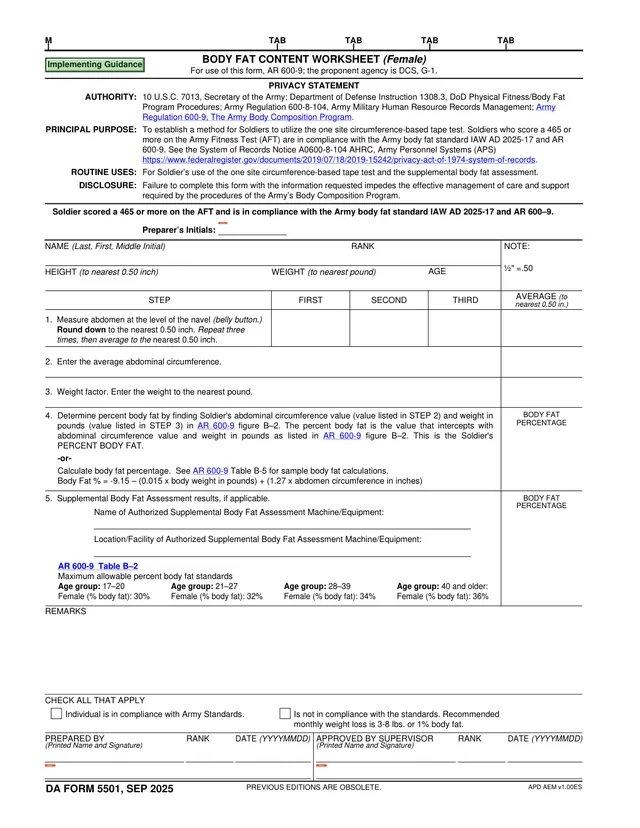
NAME (Last, First, Middle Initial)
HEIGHT (to nearest 0.50 inch)
WEIGHT (to nearest pound)
AGE
5. Supplemental Body Fat Assessment results, if applicable.
BODY FAT
PERCENTAGE
STEP
NOTE:
½" =.50
AVERAGE (to nearest 0.50 in.)
BODY FAT
PERCENTAGE
THIRD
SECOND
FIRST
2. Enter the average abdominal circumference.
Calculate body fat percentage. See AR 600-9 Table B-5 for sample body fat calculations.
Body Fat % = -9.15 – (0.015 x body weight in pounds) + (1.27 x abdomen circumference in inches)
3. Weight factor. Enter the weight to the nearest pound.
4. Determine percent body fat by finding Soldier's abdominal circumference value (value listed in STEP 2) and weight in pounds (value listed in STEP 3) in AR 600-9 figure B–2. The percent body fat is the value that intercepts with abdominal circumference value and weight in pounds as listed in AR 600-9 figure B–2. This is the Soldier's
PERCENT BODY FAT.
-or-
1. Measure abdomen at the level of the navel (belly button.)
Round down to the nearest 0.50 inch. Repeat three times, then average to the nearest 0.50 inch.
PREPARED BY
(Printed Name and Signature)
DATE (YYYYMMDD)
DATE (YYYYMMDD) APPROVED BY SUPERVISOR
(Printed Name and Signature)
How to fill it
Fill or edit this form in MePDF
- Preview page 1 to confirm the form name and revision.
- Select Fill form to answer the form one page at a time.
- Type an answer for each field; checkboxes and choices use the form’s own options.
- Preview the finished pages, then download the flattened PDF.
- The downloaded copy is image-only, so it cannot be edited as a form again.
Use the service member's full legal name and current unit details. The editor keeps the original layout while you fill the existing fields.