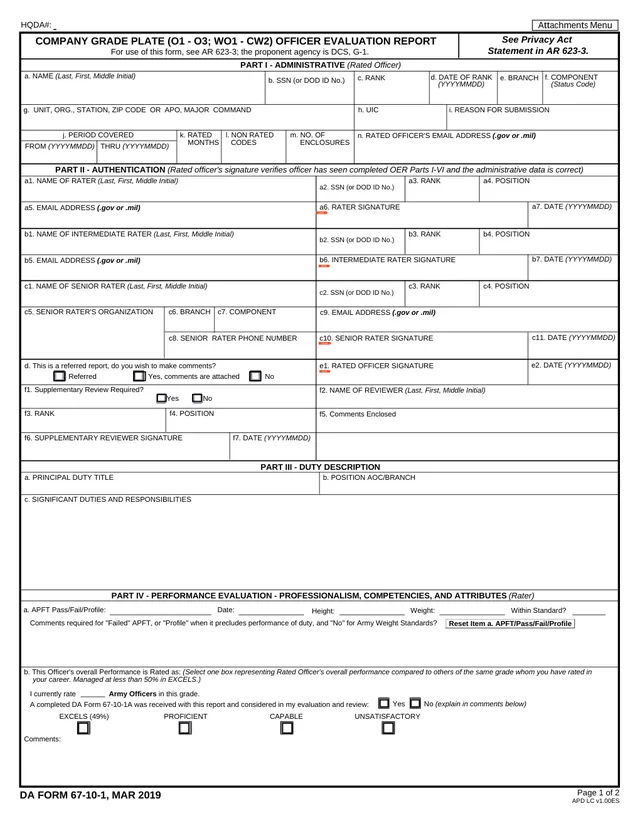
What's inside
Form content
HQDA#:
a4. POSITION d. DATE OF RANK
(YYYYMMDD) e. BRANCH f. COMPONENT
(Status Code) c4. POSITION b4. POSITION
Date:
Height:
Weight:
a. APFT Pass/Fail/Profile:
Within Standard?
Comments required for "Failed" APFT, or "Profile" when it precludes performance of duty, and "No" for Army Weight Standards?
DA FORM 67-10-1, MAR 2019
APD LC v1.00ES
For use of this form, see AR 623-3; the proponent agency is DCS, G-1.
See Privacy Act
Statement in AR 623-3.
PART I - ADMINISTRATIVE (Rated Officer) c. RANK a. NAME (Last, First, Middle Initial) g. UNIT, ORG., STATION, ZIP CODE OR APO, MAJOR COMMAND i. REASON FOR SUBMISSION h. UIC j. PERIOD COVERED
FROM (YYYYMMDD)
THRU (YYYYMMDD) k. RATED
MONTHS l. NON RATED
CODES m. NO. OF
ENCLOSURES n. RATED OFFICER'S EMAIL ADDRESS (.gov or .mil)
PART II - AUTHENTICATION (Rated officer's signature verifies officer has seen completed OER Parts I-VI and the administrative data is correct) a3. RANK a1. NAME OF RATER (Last, First, Middle Initial) a7. DATE (YYYYMMDD) b7. DATE (YYYYMMDD) b6. INTERMEDIATE RATER SIGNATURE b5. EMAIL ADDRESS (.gov or .mil) b1. NAME OF INTERMEDIATE RATER (Last, First, Middle Initial) b3. RANK a5. EMAIL ADDRESS (.gov or .mil) a6. RATER SIG
How to fill it
Fill or edit this form in MePDF
- Preview page 1 to confirm the form name and revision.
- Select Fill form to answer the form one page at a time.
- Type an answer for each field; checkboxes and choices use the form’s own options.
- Preview the finished pages, then download the flattened PDF.
- The downloaded copy is image-only, so it cannot be edited as a form again.
Use the service member's full legal name and current unit details. The editor keeps the original layout while you fill the existing fields.