What's inside
Form content
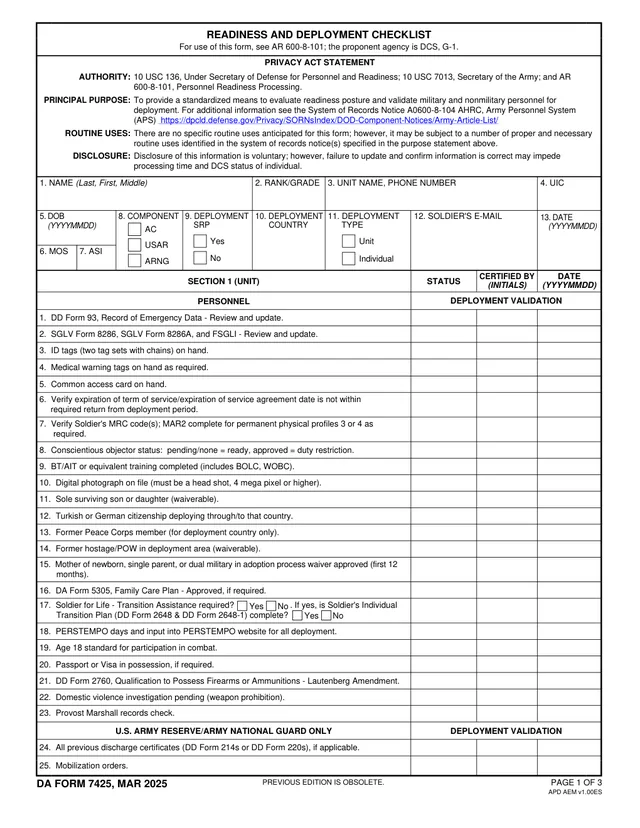
DA FORM 7425, MAR 2025
PREVIOUS EDITION IS OBSOLETE.
APD AEM v1.00ES
1. NAME (Last, First, Middle)
5. DOB
(YYYYMMDD)
2. RANK/GRADE
3. UNIT NAME, PHONE NUMBER
8. COMPONENT
READINESS AND DEPLOYMENT CHECKLIST
For use of this form, see AR 600-8-101; the proponent agency is DCS, G-1.
AUTHORITY:
PRINCIPAL PURPOSE:
ROUTINE USES:
DISCLOSURE:
10 USC 136, Under Secretary of Defense for Personnel and Readiness; 10 USC 7013, Secretary of the Army; and AR
600-8-101, Personnel Readiness Processing.
To provide a standardized means to evaluate readiness posture and validate military and nonmilitary personnel for deployment. For additional information see the System of Records Notice A0600-8-104 AHRC, Army Personnel System
(APS) https://dpcld.defense.gov/Privacy/SORNsIndex/DOD-Component-Notices/Army-Article-List/
There are no specific routine uses anticipated for this form; however, it may be subject to a number of proper and necessary routine uses identified in the system of records notice(s) specified in the purpose statement above.
Disclosure of this information is voluntary; however, failure to update and confirm information is correct may impede processing time and DCS status of individual.
6.
How to fill it
Fill or edit this form in MePDF
- Preview page 1 to confirm the form name and revision.
- Select Fill form to answer the form one page at a time.
- Type an answer for each field; checkboxes and choices use the form’s own options.
- Preview the finished pages, then download the flattened PDF.
- The downloaded copy is image-only, so it cannot be edited as a form again.
Use the service member's full legal name and current unit details. The editor keeps the original layout while you fill the existing fields.