What's inside
Form content
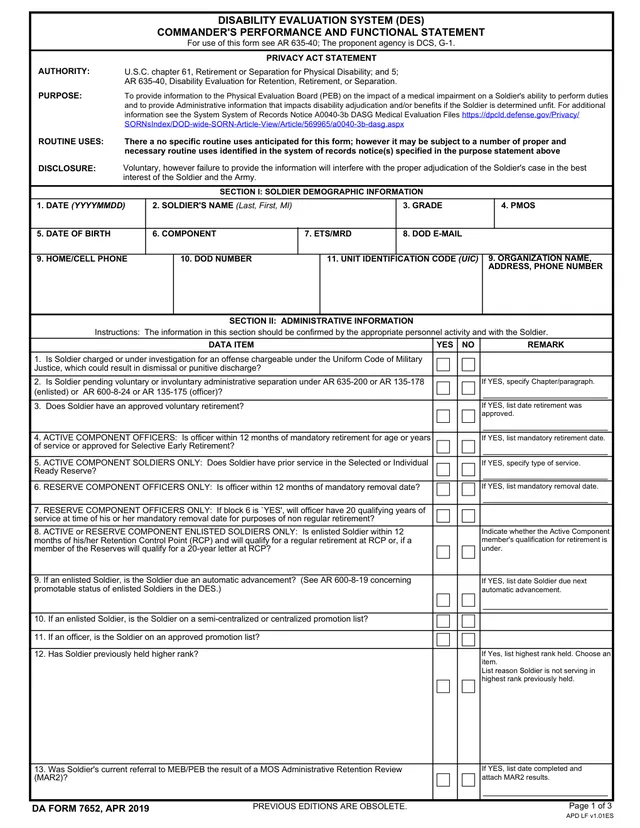
For use of this form see AR 635-40; The proponent agency is DCS, G-1.
PRIVACY ACT STATEMENT
ROUTINE USES:
Voluntary, however failure to provide the information will interfere with the proper adjudication of the Soldier's case in the best interest of the Soldier and the Army.
DISABILITY EVALUATION SYSTEM (DES)
COMMANDER'S PERFORMANCE AND FUNCTIONAL STATEMENT
AUTHORITY:
PURPOSE:
SECTION I: SOLDIER DEMOGRAPHIC INFORMATION
SECTION II: ADMINISTRATIVE INFORMATION
Instructions: The information in this section should be confirmed by the appropriate personnel activity and with the Soldier.
DISCLOSURE:
DA FORM 7652, APR 2019
APD LF v1.01ES
1. DATE (YYYYMMDD)
5. DATE OF BIRTH
2. SOLDIER'S NAME (Last, First, MI)
3. GRADE
6. COMPONENT
9. ORGANIZATION NAME,
ADDRESS, PHONE NUMBER
11. UNIT IDENTIFICATION CODE (UIC)
9. HOME/CELL PHONE
4. PMOS
7. ETS/MRD
8. DOD E-MAIL
10. DOD NUMBER
U.S.C. chapter 61, Retirement or Separation for Physical Disability; and 5;
AR 635-40, Disability Evaluation for Retention, Retirement, or Separation.
To provide information to the Physical Evaluation Board (PEB) on the impact of a medical impairment on a Soldier's ability to perform duties and to provide Administrative
How to fill it
Fill or edit this form in MePDF
- Preview page 1 to confirm the form name and revision.
- Select Fill form to answer the form one page at a time.
- Type an answer for each field; checkboxes and choices use the form’s own options.
- Preview the finished pages, then download the flattened PDF.
- The downloaded copy is image-only, so it cannot be edited as a form again.
Use the service member's full legal name and current unit details. The editor keeps the original layout while you fill the existing fields.