What's inside
Form content
DA FORM 7708, JUN 2019
APD AEM v1.02ES
FOUO
NOT FOUND
FOUND AND FORWARDED TO THE CERTIFYING OFFICIAL
19. SECURITY CLEARANCE:
NOT FOUND
20. NAME (Last, First, MI)
4. SSN
14. SIGNATURE
13. NAME (Last, First, MI)
24. NAME (Last, First, MI)
26. DATE (YYYYMMDD)
25. SIGNATURE
2. ORGANIZATION
21. SIGNATURE
22. DATE (YYYYMMDD)
15. DATE (YYYYMMDD)
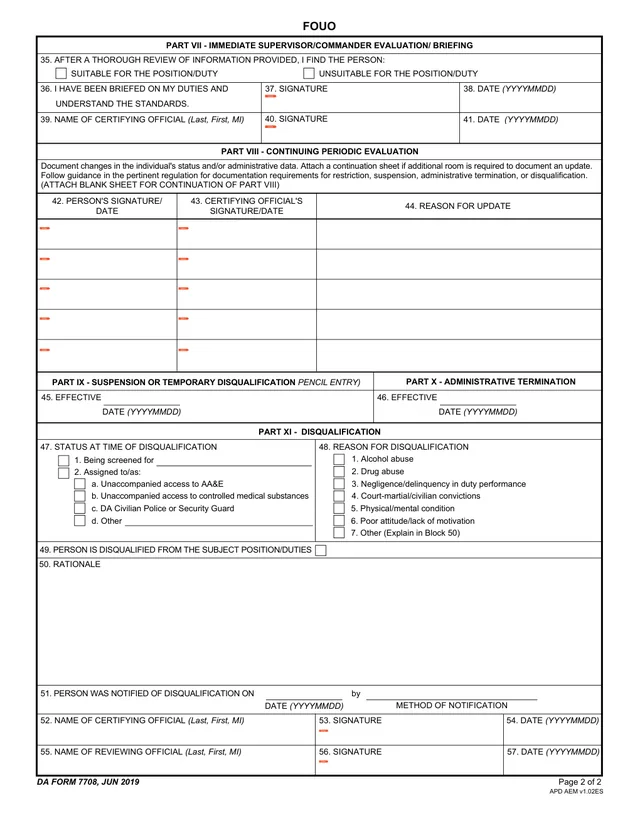
PERSONNEL RELIABILITY SCREENING AND EVALUATION
For use of this form, see AR 190-13; the proponent agency is OPMG.
CONFIDENTIAL
TYPE (NACLC, ANACI, SSBI, etc.)
16. POTENTIALLY DISQUALIFYING INFORMATION WAS
12. POTENTIALLY DISQUALIFYING INFORMATION WAS
23. POTENTIALLY DISQUALIFYING INFORMATION WAS
27. POTENTIALLY DISQUALIFYING INFORMATION WAS
PART II - CHECK OF PERSONNEL RECORDS
PART I - IMMEDIATE SUPERVISOR/COMMANDER INTERVIEW
NOT FOUND
FOUND AND FORWARDED TO THE CERTIFYING OFFICIAL
PART III - CHECK OF SECURITY RECORDS
PART VI - RESULTS OF RANDOM / DIRECTED DRUG TESTING
Authority:
Principal Purpose:
Routine Uses:
Note:
Disclosure:
10 USC 3013 Secretary of the Army; DOD 5200.08, Security of DODI Installations and Resources and the DOD Physical Security
Review Board; AR 190-13, The Army Physical Security Program; and E.O. 9397 (SSN) as amended.
FAVOR
How to fill it
Fill or edit this form in MePDF
- Preview page 2 to confirm the form name and revision.
- Select Fill form to answer the form one page at a time.
- Type an answer for each field; checkboxes and choices use the form’s own options.
- Preview the finished pages, then download the flattened PDF.
- The downloaded copy is image-only, so it cannot be edited as a form again.
Use the service member's full legal name and current unit details. The editor keeps the original layout while you fill the existing fields.