What's inside
Form content
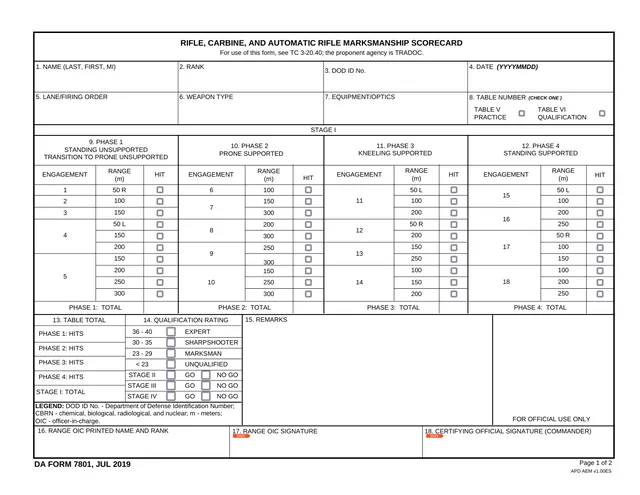
RIFLE, CARBINE, AND AUTOMATIC RIFLE MARKSMANSHIP SCORECARD
For use of this form, see TC 3-20.40; the proponent agency is TRADOC.
DA FORM 7801, JUL 2019
1. NAME (LAST, FIRST, MI)
2. RANK
4. DATE (YYYYMMDD)
3. DOD ID No.
APD AEM v1.00ES
50 L
100
200
50 R
200
150
250
100
150
200
50 L
100
200
250
50 R
100
150
100
200
250
50 R
100
150
50 L
150
200
150
200
250
300
1
2
3
4
5
6
7
8
9
10
100
150
300
200
300
250
300
150
250
300
11
12
13
14
15
16
17
18
15. REMARKS
18. CERTIFYING OFFICIAL SIGNATURE (COMMANDER)
16. RANGE OIC PRINTED NAME AND RANK
9. PHASE 1
STANDING UNSUPPORTED
TRANSITION TO PRONE UNSUPPORTED
10. PHASE 2
PRONE SUPPORTED
ENGAGEMENT
RANGE
(m)
HIT
ENGAGEMENT
RANGE
(m)
HIT
ENGAGEMENT
RANGE
(m)
HIT
ENGAGEMENT
RANGE
(m)
HIT
PHASE 1: TOTAL
PHASE 2: TOTAL
PHASE 3: TOTAL
PHASE 4: TOTAL
FOR OFFICIAL USE ONLY
11. PHASE 3
KNEELING SUPPORTED
12. PHASE 4
STANDING SUPPORTED
17. RANGE OIC SIGNATURE
LEGEND: DOD ID No. - Department of Defense Identification Number;
CBRN - chemical, biological, radiological, and nuclear; m - meters;
OIC - officer-in-charge.
8. TABLE NUMBER (CHECK ONE )
7. EQUIPMENT/OPTICS
5. LANE/FIRING ORDER
6. WEAPON TYPE
STAGE I
GO
STAGE IV
PHASE 1: HITS
PHASE 2: HITS
PHASE 3:
How to fill it
Fill or edit this form in MePDF
- Preview page 1 to confirm the form name and revision.
- Select Fill form to answer the form one page at a time.
- Type an answer for each field; checkboxes and choices use the form’s own options.
- Preview the finished pages, then download the flattened PDF.
- The downloaded copy is image-only, so it cannot be edited as a form again.
Use the service member's full legal name and current unit details. The editor keeps the original layout while you fill the existing fields.