What's inside
Form content
PREVIOUS EDITION IS OBSOLETE.
DD FORM 2345, OCT 2022
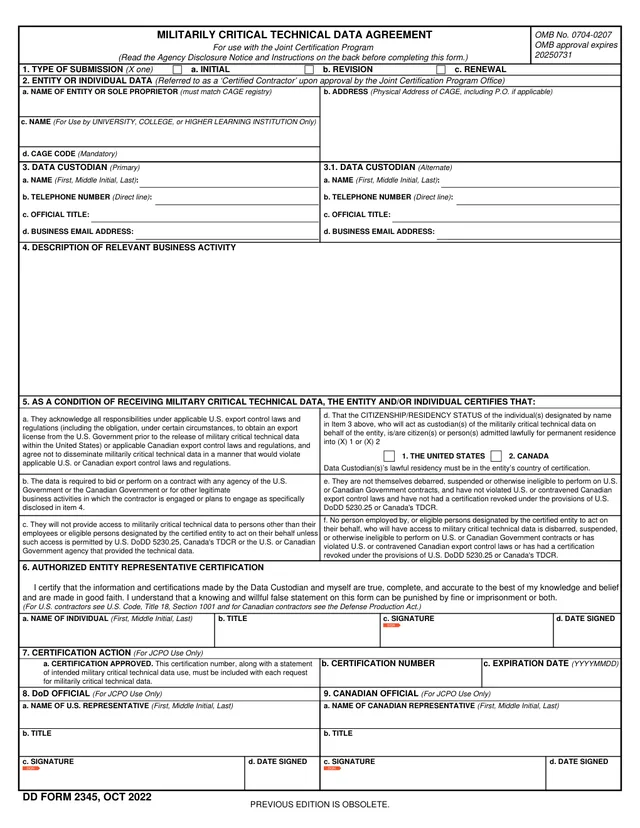
MILITARILY CRITICAL TECHNICAL DATA AGREEMENT
For use with the Joint Certification Program
(Read the Agency Disclosure Notice and Instructions on the back before completing this form.)
OMB approval expires
20250731
1. TYPE OF SUBMISSION (X one) a. INITIAL b. REVISION c. RENEWAL
2. ENTITY OR INDIVIDUAL DATA (Referred to as a ‘Certified Contractor’ upon approval by the Joint Certification Program Office) a. NAME OF ENTITY OR SOLE PROPRIETOR (must match CAGE registry) c. NAME (For Use by UNIVERSITY, COLLEGE, or HIGHER LEARNING INSTITUTION Only) d. CAGE CODE (Mandatory) b. ADDRESS (Physical Address of CAGE, including P.O. if applicable)
3. DATA CUSTODIAN (Primary) a. NAME (First, Middle Initial, Last):
b. TELEPHONE NUMBER (Direct line):
c. OFFICIAL TITLE:
d. BUSINESS EMAIL ADDRESS:
3.1. DATA CUSTODIAN (Alternate) a. NAME (First, Middle Initial, Last):
b. TELEPHONE NUMBER (Direct line):
c. OFFICIAL TITLE:
d. BUSINESS EMAIL ADDRESS:
4. DESCRIPTION OF RELEVANT BUSINESS ACTIVITY
5. AS A CONDITION OF RECEIVING MILITARY CRITICAL TECHNICAL DATA, THE ENTITY AND/OR INDIVIDUAL CERTIFIES THAT:
a. They acknowledge all responsibilities under appli
How to fill it
Fill or edit this form in MePDF
- Preview page 1 to confirm the form name and revision.
- Select Fill form to answer the form one page at a time.
- Type an answer for each field; checkboxes and choices use the form’s own options.
- Preview the finished pages, then download the flattened PDF.
- The downloaded copy is image-only, so it cannot be edited as a form again.
Use the service member's full legal name and current unit details. The editor keeps the original layout while you fill the existing fields.