What's inside
Form content
Page of
PREVIOUS EDITION IS OBSOLETE.
DD FORM 250, AUG 2000
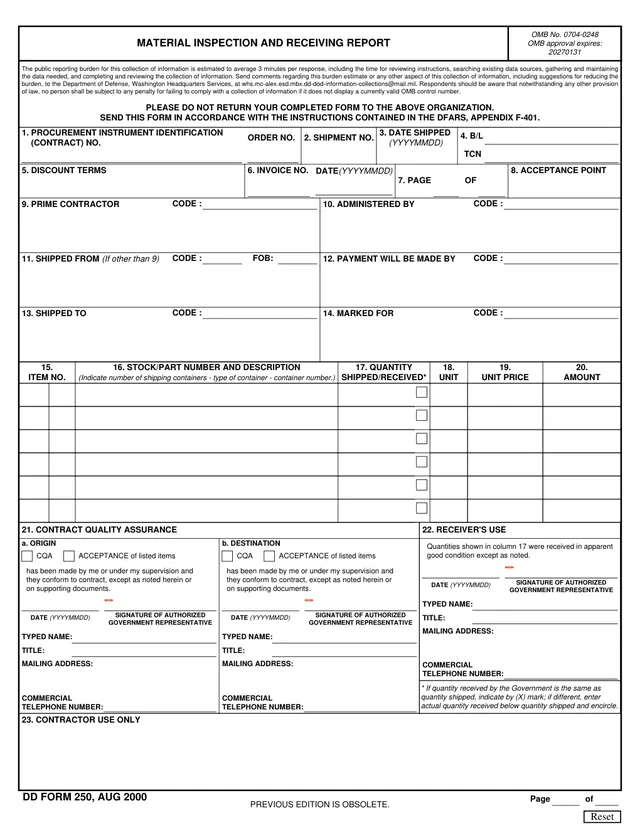
MATERIAL INSPECTION AND RECEIVING REPORT
OMB approval expires:
20270131
The public reporting burden for this collection of information is estimated to average 3 minutes per response, including the time for reviewing instructions, searching existing data sources, gathering and maintaining the data needed, and completing and reviewing the collection of information. Send comments regarding this burden estimate or any other aspect of this collection of information, including suggestions for reducing the burden, to the Department of Defense, Washington Headquarters Services, at [email protected]. Respondents should be aware that notwithstanding any other provision of law, no person shall be subject to any penalty for failing to comply with a collection of information if it does not display a currently valid OMB control number.
PLEASE DO NOT RETURN YOUR COMPLETED FORM TO THE ABOVE ORGANIZATION.
SEND THIS FORM IN ACCORDANCE WITH THE INSTRUCTIONS CONTAINED IN THE DFARS, APPENDIX F-401.
1. PROCUREMENT INSTRUMENT IDENTIFICATION
(CONTRACT) NO.
ORDER NO.
2. SHIPMENT NO. 3. DATE SHIPPED
(YYYYMM
How to fill it
Fill or edit this form in MePDF
- Preview page 1 to confirm the form name and revision.
- Select Fill form to answer the form one page at a time.
- Type an answer for each field; checkboxes and choices use the form’s own options.
- Preview the finished pages, then download the flattened PDF.
- The downloaded copy is image-only, so it cannot be edited as a form again.
Use the service member's full legal name and current unit details. The editor keeps the original layout while you fill the existing fields.