What's inside
Form content
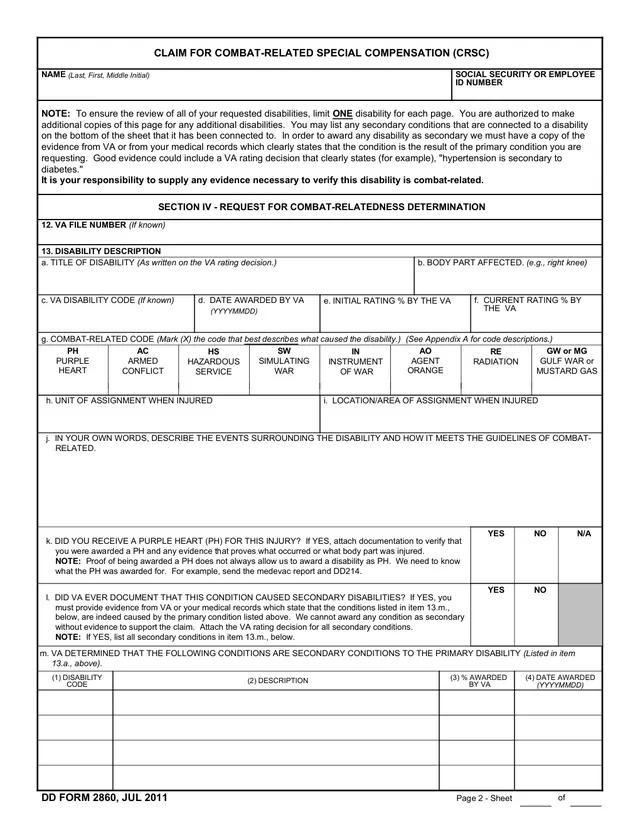
CLAIM FOR COMBAT-RELATED SPECIAL COMPENSATION (CRSC)
PRIVACY ACT STATEMENT
AUTHORITY: 10 U.S. Code Section 1413a; DoD Financial Management Regulation, Volume 7B Chapter 63; and E.O. 9397 (SSN).
PRINCIPAL PURPOSE(S): Used by a military retiree to submit a claim through the appropriate uniformed service for Combat-
Related Special Compensation (CRSC). Claim is reviewed to determine eligibility for benefits, and determine the amount and effective dates of payment.
ROUTINE USE(S): Information is provided to individuals authorized to receive retired and annuitant payments on behalf of retirees or annuitants.
DISCLOSURE: Voluntary; however, failure to provide any required information may result in member not being considered eligible for CRSC.
GENERAL INSTRUCTIONS
Complete this form carefully and accurately.
To submit a valid claim you must complete the ENTIRE FORM and SIGN IT IN SECTION VI (bottom of Page 3). Unsigned claim forms will not be processed.
Complete and submit this form (pages 1 - 3 ONLY) to apply for Combat-Related Special Compensation (CRSC). Print, type, or use a computer and provide the best information available. If you do not know the answer, enter "Don't Know" or "DK"
How to fill it
Fill or edit this form in MePDF
- Preview page 3 to confirm the form name and revision.
- Select Fill form to answer the form one page at a time.
- Type an answer for each field; checkboxes and choices use the form’s own options.
- Preview the finished pages, then download the flattened PDF.
- The downloaded copy is image-only, so it cannot be edited as a form again.
Use the service member's full legal name and current unit details. The editor keeps the original layout while you fill the existing fields.