What's inside
Form content
PREVIOUS EDITION IS OBSOLETE.
DD FORM 3, AUGUST 2020
CUI (when filled in)
CUI (when filled in)
Controlled by: OUSD(P&R)
CUI Category: PRVCY
Distribution/Dissemination Control: FEDCON
POC: [email protected]
(Updated 20251219)
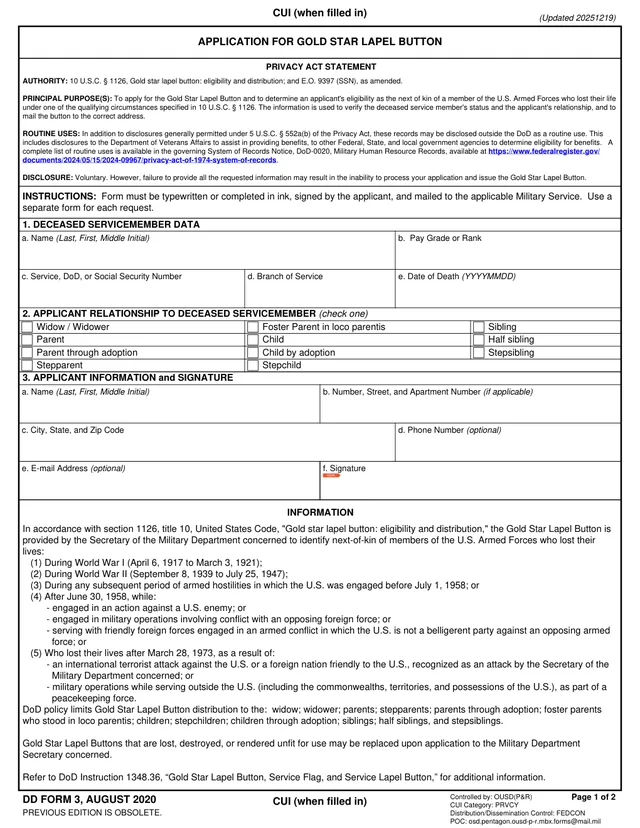
APPLICATION FOR GOLD STAR LAPEL BUTTON
PRIVACY ACT STATEMENT
AUTHORITY: 10 U.S.C. § 1126, Gold star lapel button: eligibility and distribution; and E.O. 9397 (SSN), as amended.
PRINCIPAL PURPOSE(S): To apply for the Gold Star Lapel Button and to determine an applicant's eligibility as the next of kin of a member of the U.S. Armed Forces who lost their life under one of the qualifying circumstances specified in 10 U.S.C. § 1126. The information is used to verify the deceased service member's status and the applicant's relationship, and to mail the button to the correct address.
ROUTINE USES: In addition to disclosures generally permitted under 5 U.S.C. § 552a(b) of the Privacy Act, these records may be disclosed outside the DoD as a routine use. This includes disclosures to the Department of Veterans Affairs to assist in providing benefits, to other Federal, State, and local government agencies to determine eligibility for benefits. A comp
How to fill it
Fill or edit this form in MePDF
- Preview page 1 to confirm the form name and revision.
- Select Fill form to answer the form one page at a time.
- Type an answer for each field; checkboxes and choices use the form’s own options.
- Preview the finished pages, then download the flattened PDF.
- The downloaded copy is image-only, so it cannot be edited as a form again.
Use the service member's full legal name and current unit details. The editor keeps the original layout while you fill the existing fields.