What's inside
Form content
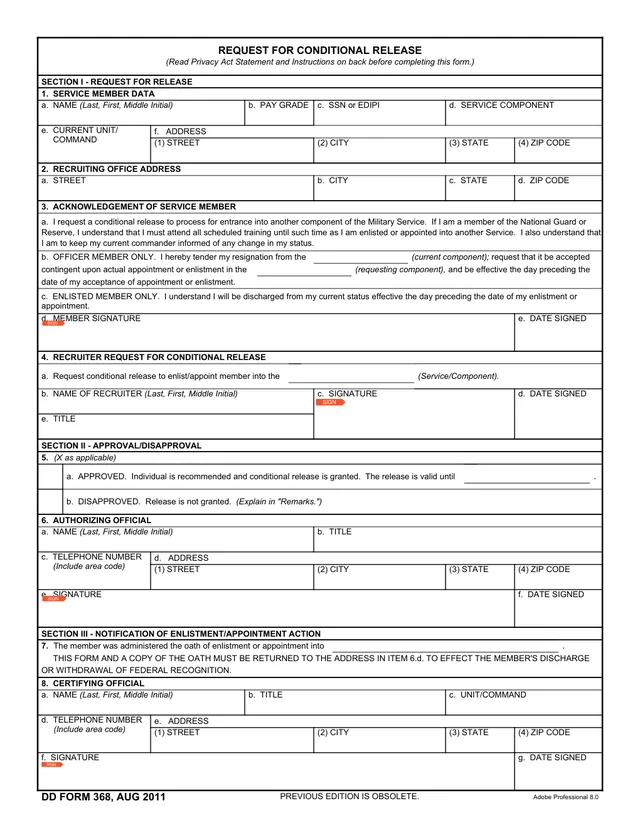
REQUEST FOR CONDITIONAL RELEASE
(Read Privacy Act Statement and Instructions on back before completing this form.)
SECTION I - REQUEST FOR RELEASE
1. SERVICE MEMBER DATA
2. RECRUITING OFFICE ADDRESS a. NAME (Last, First, Middle Initial) b. PAY GRADE d. SERVICE COMPONENT c. SSN or EDIPI
3. ACKNOWLEDGEMENT OF SERVICE MEMBER a. I request a conditional release to process for entrance into another component of the Military Service. If I am a member of the National Guard or
Reserve, I understand that I must attend all scheduled training until such time as I am enlisted or appointed into another Service. I also understand that
I am to keep my current commander informed of any change in my status.
b. OFFICER MEMBER ONLY. I hereby tender my resignation from the d. MEMBER SIGNATURE e. DATE SIGNED
4. RECRUITER REQUEST FOR CONDITIONAL RELEASE a. Request conditional release to enlist/appoint member into the b. NAME OF RECRUITER (Last, First, Middle Initial) e. TITLE c. SIGNATURE d. DATE SIGNED
SECTION II - APPROVAL/DISAPPROVAL
5. (X as applicable) a. APPROVED. Individual is recommended and conditional release is granted. The release is valid until
.
6. AUTHORIZING OFFICIAL a. NAME (Last, First,
How to fill it
Fill or edit this form in MePDF
- Preview page 1 to confirm the form name and revision.
- Select Fill form to answer the form one page at a time.
- Type an answer for each field; checkboxes and choices use the form’s own options.
- Preview the finished pages, then download the flattened PDF.
- The downloaded copy is image-only, so it cannot be edited as a form again.
Use the service member's full legal name and current unit details. The editor keeps the original layout while you fill the existing fields.