What's inside
Form content
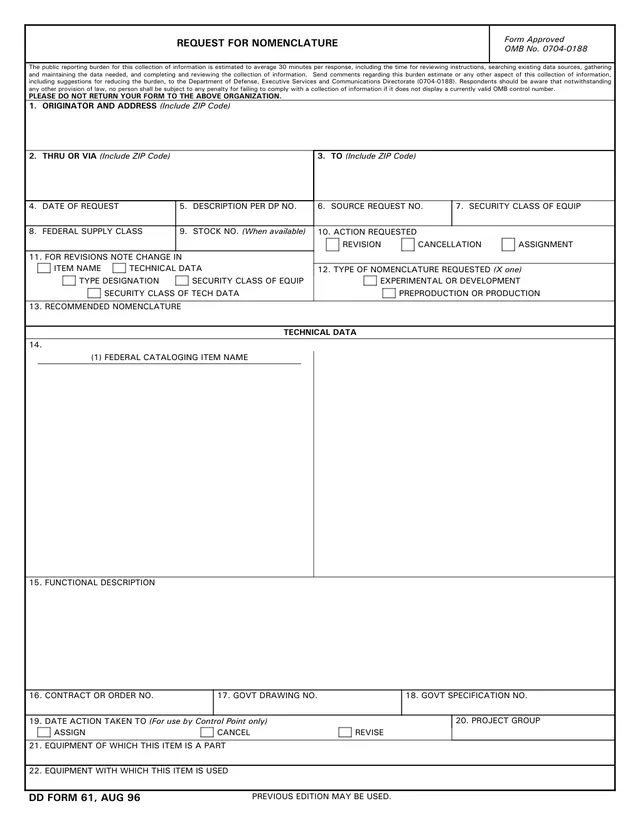
REQUEST FOR NOMENCLATURE
1. ORIGINATOR AND ADDRESS (Include ZIP Code)
2. THRU OR VIA (Include ZIP Code)
3. TO (Include ZIP Code)
4. DATE OF REQUEST
5. DESCRIPTION PER DP NO.
6. SOURCE REQUEST NO.
7. SECURITY CLASS OF EQUIP
8. FEDERAL SUPPLY CLASS
9. STOCK NO. (When available)
10. ACTION REQUESTED
REVISION
CANCELLATION
ASSIGNMENT
11. FOR REVISIONS NOTE CHANGE IN
ITEM NAME
TECHNICAL DATA
TYPE DESIGNATION
SECURITY CLASS OF EQUIP
SECURITY CLASS OF TECH DATA
12. TYPE OF NOMENCLATURE REQUESTED (X one)
EXPERIMENTAL OR DEVELOPMENT
PREPRODUCTION OR PRODUCTION
13. RECOMMENDED NOMENCLATURE
TECHNICAL DATA
14.
(1) FEDERAL CATALOGING ITEM NAME
15. FUNCTIONAL DESCRIPTION
16. CONTRACT OR ORDER NO.
17. GOVT DRAWING NO.
18. GOVT SPECIFICATION NO.
19. DATE ACTION TAKEN TO (For use by Control Point only)
ASSIGN
CANCEL
REVISE
20. PROJECT GROUP
21. EQUIPMENT OF WHICH THIS ITEM IS A PART
22. EQUIPMENT WITH WHICH THIS ITEM IS USED
DD FORM 61, AUG 96
PREVIOUS EDITION MAY BE USED.
The public reporting burden for this collection of information is estimated to average 30 minutes per response, including the time for reviewing instructions, searching existing data sources, gathering and maintaining the data nee
How to fill it
Fill or edit this form in MePDF
- Preview page 1 to confirm the form name and revision.
- Select Fill form to answer the form one page at a time.
- Type an answer for each field; checkboxes and choices use the form’s own options.
- Preview the finished pages, then download the flattened PDF.
- The downloaded copy is image-only, so it cannot be edited as a form again.
Use the service member's full legal name and current unit details. The editor keeps the original layout while you fill the existing fields.