What's inside
Form content
ALASKA STANDARD LEASE AGREEMENT
1. THE PARTIES. This Residential Lease Agreement (“Agreement”) is made on the undersigned date by and between:
Landlord
Landlord's Name: _______________________
Mailing Address: ______________________________________________
Tenant
Tenant’s Name: _______________________
Additional Occupants: ______________________________________________
2. PROPERTY.
•
Property Address: ______________________________________________
•
Residence Type: ☐ Apartment ☐ House ☐ Condo ☐ Other: ______________
•
Bedroom(s): ____ Bathroom(s): ____
3. TERM.
•
Start Date: _______________________
•
End Date: _______________________
4. RENT.
•
Monthly Rent: $_________
•
Due Date: ____ day of each month.
5. SECURITY DEPOSIT. (check one)
☐- No Security Deposit.
☐- Security Deposit.
•
Amount: $_________
•
Returning to Tenant: ____ days after lease termination.
6. LATE FEE. (check one)
☐- No Late Fee.
☐- Late Fee: (check one)
☐- Fixed Amount. $_________ for each ☐ occurrence ☐ day rent is late.
☐- Interest. ____% per annum.
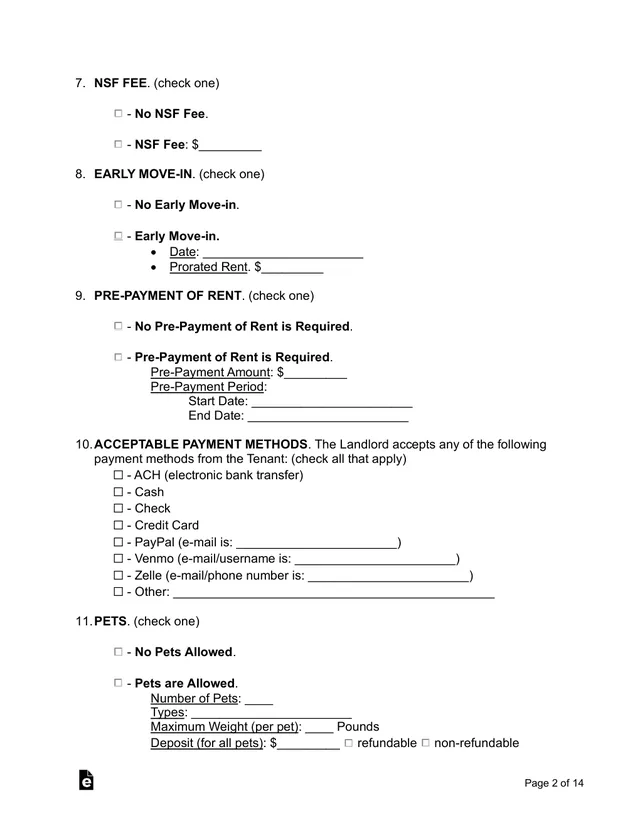
7. NSF FEE. (check one)
☐- No NSF Fee.
☐- NSF Fee: $_________
8. EARLY MOVE-IN. (check one)
☐- No Early Move-in.
☐- Early Move-in.
•
Date: _______________________
How to fill it
Fill or edit this form in MePDF
- Preview page 2 to confirm the form name and revision.
- Select Fill form to answer the form one page at a time.
- Type an answer for each field; checkboxes and choices use the form’s own options.
- Preview the finished pages, then download the flattened PDF.
- The downloaded copy is image-only, so it cannot be edited as a form again.
Confirm the property address and the parties' legal names. The editor keeps the original layout while you fill the existing fields.