What's inside
Form content
© Superior Court of Arizona in Maricopa County
ALL RIGHTS RESERVED
DR7 – 5010 – 060925
CONSENT
DECREE
FOR DIVORCE or LEGAL SEPARATION for a NON-COVENANT MARRIAGE
WITH CHILDREN
4
To get the Decree when both parties agree
Forms and Instructions
©Superior Court of Arizona in Maricopa County
DR7k 060925
ALL RIGHTS RESERVED
Law Library Resource Center
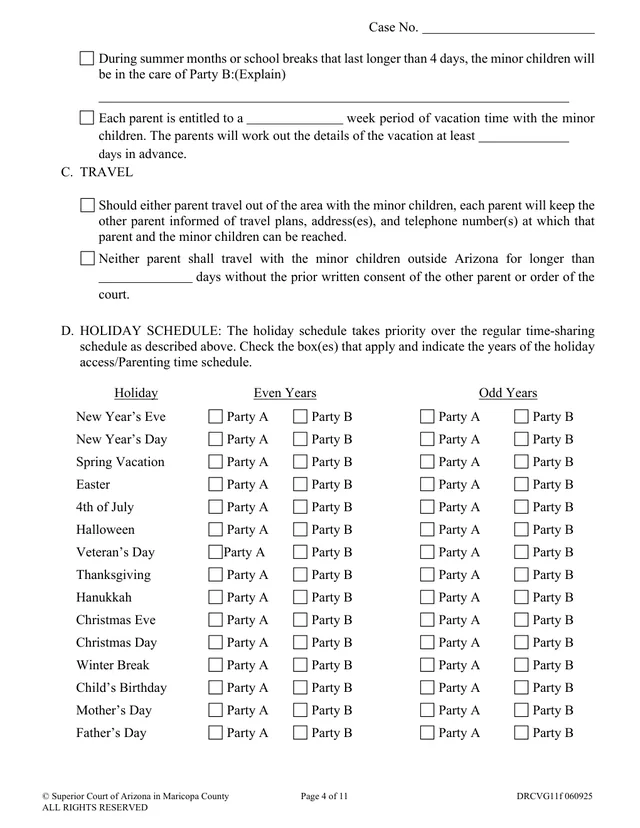
Consent Decree for divorce or legal separation with minor children
Checklist
You may use these forms if . . .
You or your spouse filed a Petition for divorce or legal separation in a non-covenant marriage with minor children, AND
You and your spouse agree to the divorce or legal separation, and you agree on all terms of the divorce or legal separation, including:
•
Division of property and debt,
•
Spousal Maintenance (if applicable),
•
Legal Decision-making, Parenting and Support of minor children
AND
You and your spouse will provide your notarized signatures on the Consent Decree to indicate your agreement on all terms.
Do not use these forms if:
You disagree on any terms of the divorce or legal separation,
The filing fee for a Response has not been paid by either party, and you prefer to proceed with a Default Decree in order to
How to fill it
Fill or edit this form in MePDF
- Preview page 45 to confirm the form name and revision.
- Select Fill form to answer the form one page at a time.
- Type an answer for each field; checkboxes and choices use the form’s own options.
- Preview the finished pages, then download the flattened PDF.
- The downloaded copy is image-only, so it cannot be edited as a form again.
Fill only the fields that apply and do not change clauses you were not asked to change. The editor keeps the original layout while you fill the existing fields.