What's inside
Form content
("Tenant") agree as follows:
1.
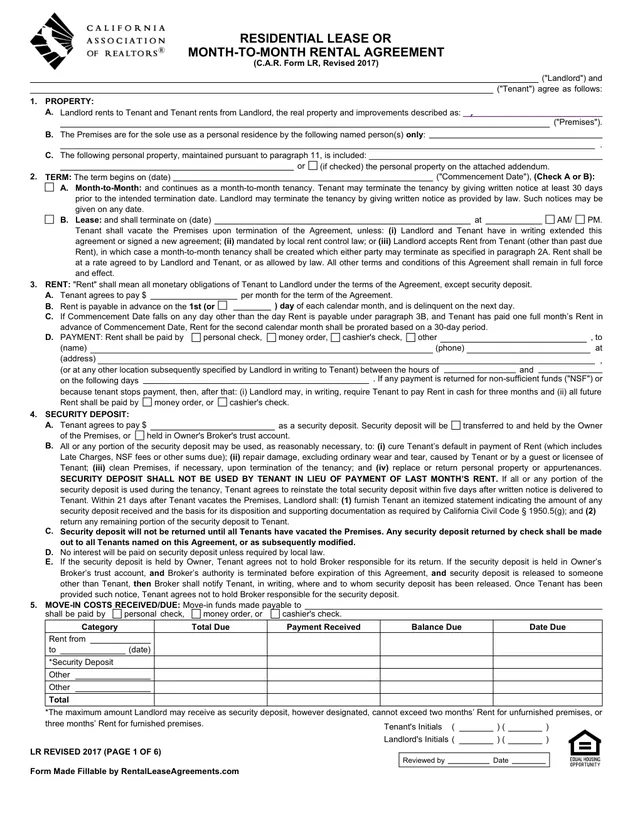
Landlord rents to Tenant and Tenant rents from Landlord, the real property and improvements described as:
("Premises").
The Premises are for the sole use as a personal residence by the following named person(s) only:
2.
TERM: The term begins on (date)
("Commencement Date"), (Check A or B):
B.
Lease: and shall terminate on (date) at
AM/
PM.
Tenant shall vacate the Premises upon termination of the Agreement, unless: (i) Landlord and Tenant have in writing extended this agreement or signed a new agreement; (ii) mandated by local rent control law; or (iii) Landlord accepts Rent from Tenant (other than past due
Rent), in which case a month-to-month tenancy shall be created which either party may terminate as specified in paragraph 2A. Rent shall be at a rate agreed to by Landlord and Tenant, or as allowed by law. All other terms and conditions of this Agreement shall remain in full force and effect.
A.
Month-to-Month: and continues as a month-to-month tenancy. Tenant may terminate the tenancy by giving written notice at least 30 days prior to the intended termination date. Landlord may terminate the tenancy by giving written notice as provided by law. Suc
How to fill it
Fill or edit this form in MePDF
- Preview page 1 to confirm the form name and revision.
- Select Fill form to answer the form one page at a time.
- Type an answer for each field; checkboxes and choices use the form’s own options.
- Preview the finished pages, then download the flattened PDF.
- The downloaded copy is image-only, so it cannot be edited as a form again.
Confirm the property address and the parties' legal names. The editor keeps the original layout while you fill the existing fields.