What's inside
Form content
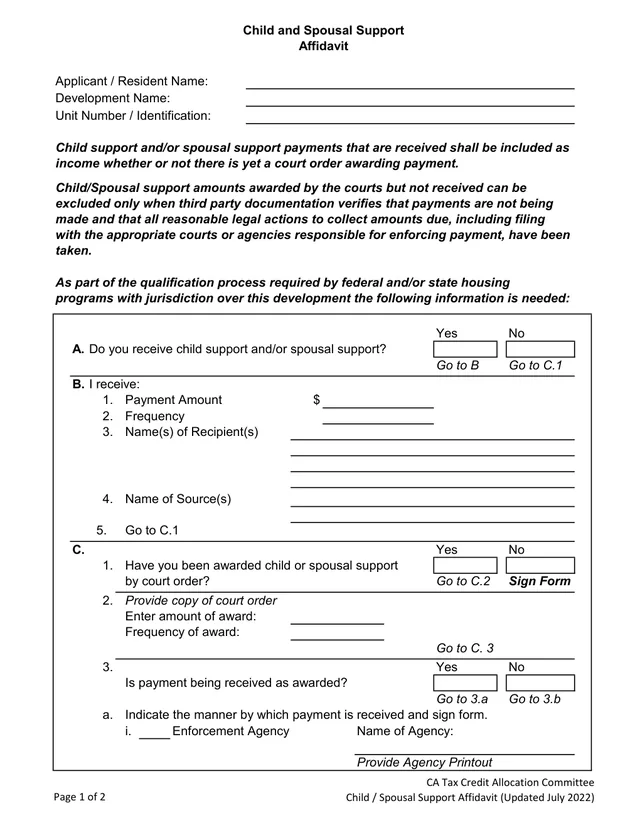
Child and Spousal Support
Affidavit
Applicant / Resident Name:
Development Name:
Unit Number / Identification:
Yes
No
A. Do you receive child support and/or spousal support?
Go to B
Go to C.1
B. I receive:
1.
Payment Amount
$
2.
Frequency
3.
Name(s) of Recipient(s)
4.
Name of Source(s)
5.
Go to C.1
C.
Yes
No
1.
Have you been awarded child or spousal support by court order?
Go to C.2
Sign Form
2.
Provide copy of court order
Enter amount of award:
Frequency of award:
Go to C. 3
3.
Yes
No
Is payment being received as awarded?
Go to 3.a
Go to 3.b a.
Indicate the manner by which payment is received and sign form.
i.
Enforcement Agency
Name of Agency:
Provide Agency Printout
Child support and/or spousal support payments that are received shall be included as income whether or not there is yet a court order awarding payment.
Child/Spousal support amounts awarded by the courts but not received can be excluded only when third party documentation verifies that payments are not being made and that all reasonable legal actions to collect amounts due, including filing with the appropriate courts or agencies responsible for enforcing payment, have been taken.
As part of the qualification process
How to fill it
Fill or edit this form in MePDF
- Preview page 1 to confirm the form name and revision.
- Select Fill form to answer the form one page at a time.
- Type an answer for each field; checkboxes and choices use the form’s own options.
- Preview the finished pages, then download the flattened PDF.
- The downloaded copy is image-only, so it cannot be edited as a form again.
Fill only the fields that apply and do not change clauses you were not asked to change. The editor keeps the original layout while you fill the existing fields.