What's inside
Form content
Total
Attest (Name and title)
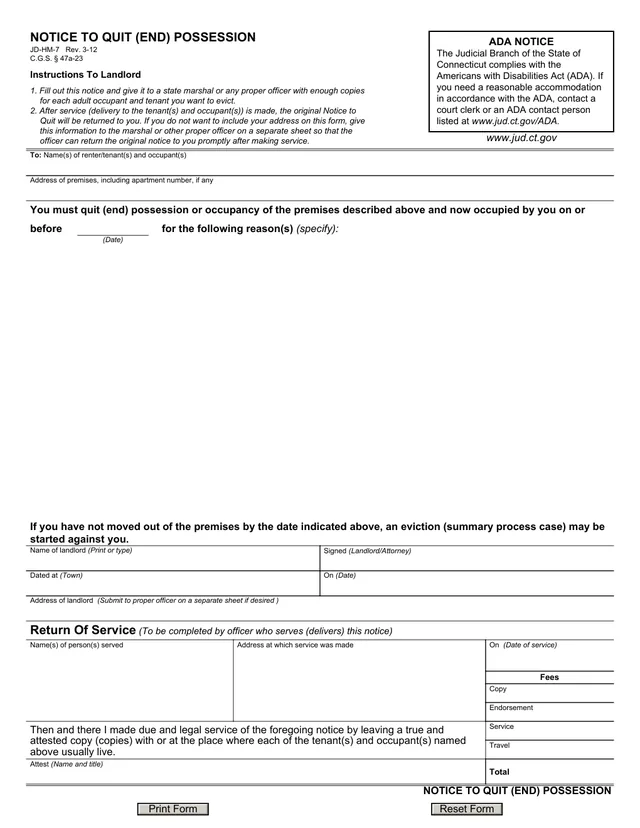
Then and there I made due and legal service of the foregoing notice by leaving a true and attested copy (copies) with or at the place where each of the tenant(s) and occupant(s) named above usually live.
Name(s) of person(s) served
Address at which service was made
On (Date of service)
Fees
Signed (Landlord/Attorney)
NOTICE TO QUIT (END) POSSESSION
JD-HM-7 Rev. 3-12
C.G.S. § 47a-23
Return Of Service (To be completed by officer who serves (delivers) this notice)
You must quit (end) possession or occupancy of the premises described above and now occupied by you on or before for the following reason(s) (specify):
Endorsement
Service
Travel
Copy
If you have not moved out of the premises by the date indicated above, an eviction (summary process case) may be started against you.
Instructions To Landlord
1. Fill out this notice and give it to a state marshal or any proper officer with enough copies for each adult occupant and tenant you want to evict.
2. After service (delivery to the tenant(s) and occupant(s)) is made, the original Notice to
Quit will be returned to you. If you do not want to include your address on this form, give this information to the ma
How to fill it
Fill or edit this form in MePDF
- Preview page 1 to confirm the form name and revision.
- Select Fill form to answer the form one page at a time.
- Type an answer for each field; checkboxes and choices use the form’s own options.
- Preview the finished pages, then download the flattened PDF.
- The downloaded copy is image-only, so it cannot be edited as a form again.
Confirm the property address and the parties' legal names. The editor keeps the original layout while you fill the existing fields.