What's inside
Form content
JUSTICE OF THE PEACE COURT OF THE STATE OF DELAWARE
IN AND FOR
COUNTY
COURT NO.
VIEW YOUR CASE ONLINE: https://courtconnect.courts.delaware.gov/
JP Ci vil Form No. 13 (rev 5/27/2025)
COURT ADDRESS
CIVIL ACTION NO
PLAINTIFF(S)
VS.
DEFENDANT(S)
Address (street, city, state, zip code)
Address (street, city, state, zip code)
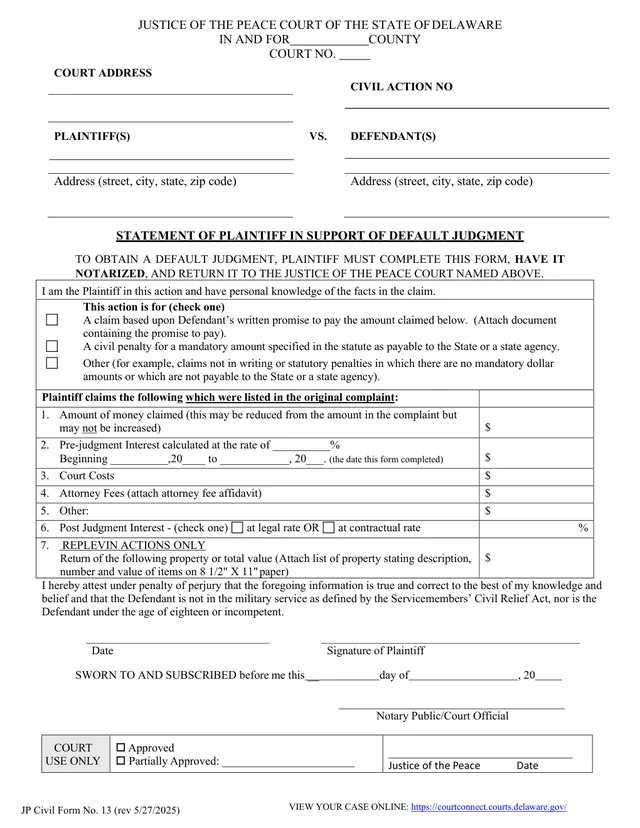
STATEMENT OF PLAINTIFF IN SUPPORT OF DEFAULT JUDGMENT
TO OBTAIN A DEFAULT JUDGMENT, PLAINTIFF MUST COMPLETE THIS FORM, HAVE IT
NOTARIZED, AND RETURN IT TO THE JUSTICE OF THE PEACE COURT NAMED ABOVE.
I am the Plaintiff in this action and have personal knowledge of the facts in the claim.
This action is for (check one)
A claim based upon Defendant’s written promise to pay the amount claimed below. (Attach document containing the promise to pay).
A civil penalty for a mandatory amount specified in the statute as payable to the State or a state agency.
Other (for example, claims not in writing or statutory penalties in which there are no mandatory dollar amounts or which are not payable to the State or a state agency).
Plaintiff claims the following which were listed in the original complaint:
1.
Amount of money claimed (this may be reduced from the amount in the compl
How to fill it
Fill or edit this form in MePDF
- Preview page 1 to confirm the form name and revision.
- Select Fill form to answer the form one page at a time.
- Type an answer for each field; checkboxes and choices use the form’s own options.
- Preview the finished pages, then download the flattened PDF.
- The downloaded copy is image-only, so it cannot be edited as a form again.
Fill only the fields that apply and do not change clauses you were not asked to change. The editor keeps the original layout while you fill the existing fields.