What's inside
Form content
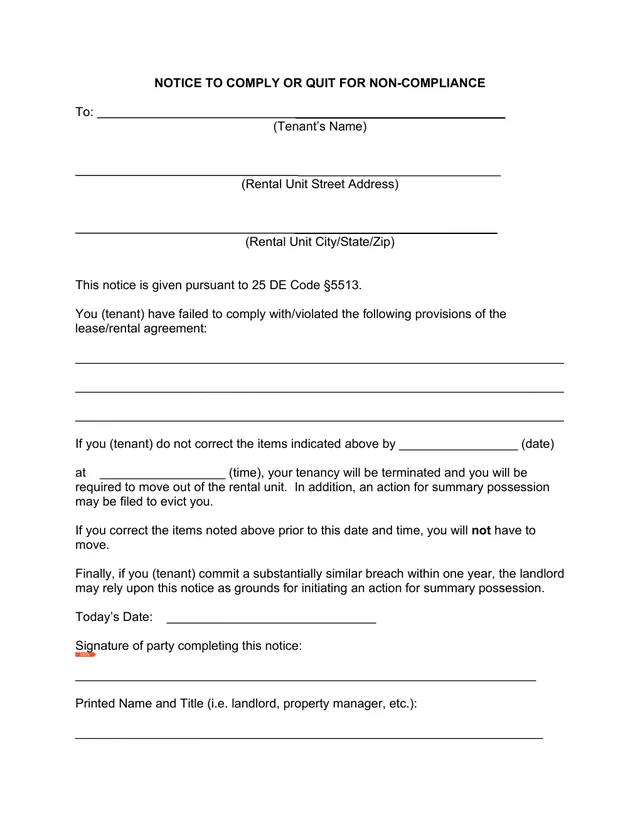
NOTICE TO COMPLY OR QUIT FOR NON-COMPLIANCE
To: _
(Tenant’s Name)
_
(Rental Unit Street Address)
_
(Rental Unit City/State/Zip)
This notice is given pursuant to 25 DE Code §5513.
You (tenant) have failed to comply with/violated the following provisions of the lease/rental agreement:
___
___
If you (tenant) do not correct the items indicated above by
(date) at
(time), your tenancy will be terminated and you will be required to move out of the rental unit. In addition, an action for summary possession may be filed to evict you.
If you correct the items noted above prior to this date and time, you will not have to move.
Finally, if you (tenant) commit a substantially similar breach within one year, the landlord may rely upon this notice as grounds for initiating an action for summary possession.
Today’s Date: _
Signature of party completing this notice:
Printed Name and Title (i.e. landlord, property manager, etc.):
SIGN
Tenant’s Acknowledgement
On _
(date) at
(time), tenant acknowledged receipt of this notice.
Tenant Signature and Date
Certificate of Service
I certify that I personally served this notice on the following person:
OR
I mailed a copy of the notice to the tenant via firs
How to fill it
Fill or edit this form in MePDF
- Preview page 1 to confirm the form name and revision.
- Select Fill form to answer the form one page at a time.
- Type an answer for each field; checkboxes and choices use the form’s own options.
- Preview the finished pages, then download the flattened PDF.
- The downloaded copy is image-only, so it cannot be edited as a form again.
Confirm the property address and the parties' legal names. The editor keeps the original layout while you fill the existing fields.