What's inside
Form content
_____________________________________________
INSTRUCTIONS FOR FLORIDA SUPREME COURT APPROVED FAMILY LAW
CERTIFICATE OF SERVICE (11/15)
When should this form be used?
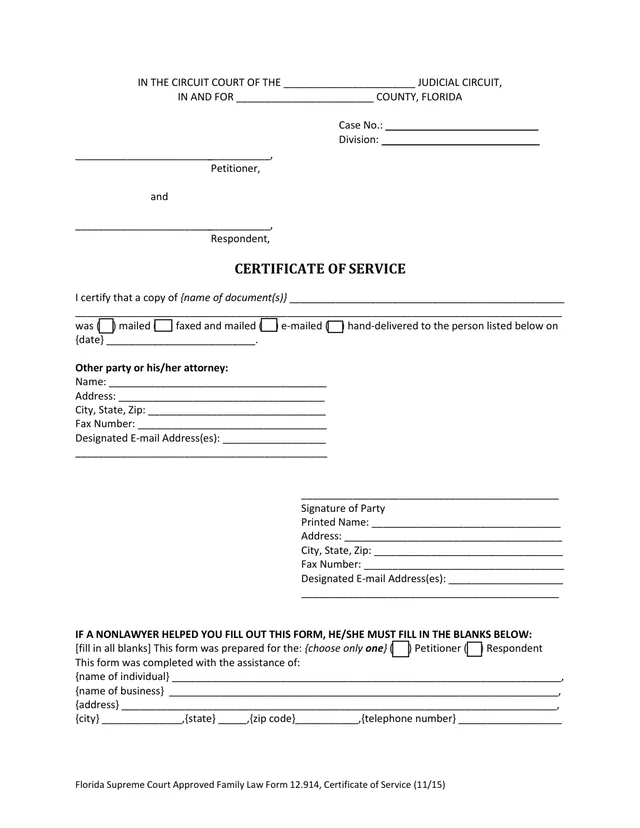
After a petition or supplemental petition has been properly served (through either personal service or constructive service), both parties must serve copies of all additional documents or papers they file with the clerk on the other party, or his or her attorney, if he or she has one. Each time you file a document, you must certify that you provided the other party with a copy. Many of the Florida Family Law Forms already have a place above the signature line for this certification. It looks like this:
I certify that a copy of this document was (
) mailed ( ) faxed and mailed (
) e-mailed (
) hand-delivered to the person(s) listed below on {date} ______________________________________
Other party or his/her attorney:
Name: _______________________________________
Address: _____________________________________
City, State, Zip: ________________________________
Fax Number: __________________________________
Designated E-mail Address(es):____________________
If a form you are filing has a certificate, you do not need to f
How to fill it
Fill or edit this form in MePDF
- Preview page 3 to confirm the form name and revision.
- Select Fill form to answer the form one page at a time.
- Type an answer for each field; checkboxes and choices use the form’s own options.
- Preview the finished pages, then download the flattened PDF.
- The downloaded copy is image-only, so it cannot be edited as a form again.
Fill only the fields that apply and do not change clauses you were not asked to change. The editor keeps the original layout while you fill the existing fields.