What's inside
Form content
Last
First Middle
STATE OF FLORIDA
DEPARTMENT OF HIGHWAY SAFETY AND MOTOR VEHICLES
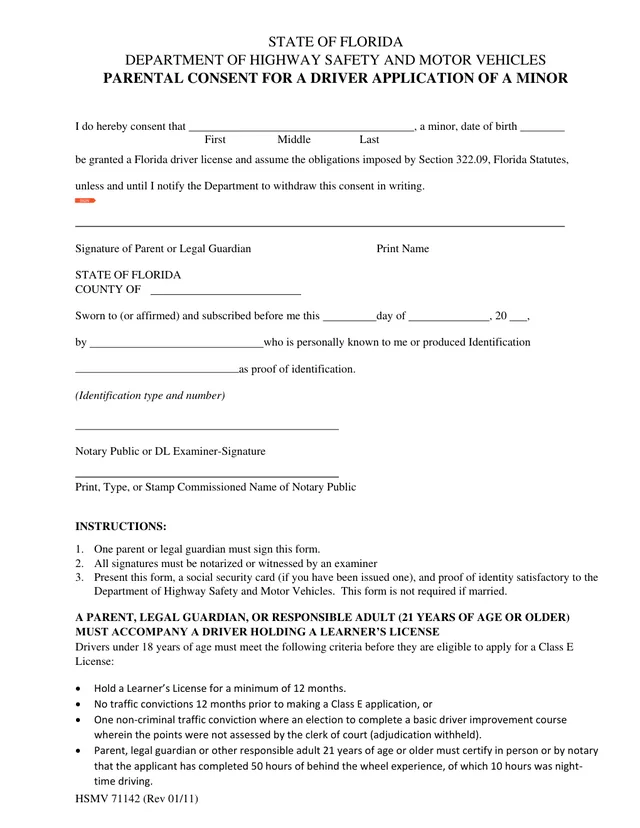
PARENTAL CONSENT FOR A DRIVER APPLICATION OF A MINOR
I do hereby consent that
, a minor, date of birth be granted a Florida driver license and assume the obligations imposed by Section 322.09, Florida Statutes, unless and until I notify the Department to withdraw this consent in writing.
Signature of Parent or Legal Guardian
Print Name
STATE OF FLORIDA
COUNTY OF
Sworn to (or affirmed) and subscribed before me this day of
, 20
, by who is personally known to me or produced Identification as proof of identification.
(Identification type and number)
Notary Public or DL Examiner-Signature
Print, Type, or Stamp Commissioned Name of Notary Public
INSTRUCTIONS:
1. One parent or legal guardian must sign this form.
2. All signatures must be notarized or witnessed by an examiner
3. Present this form, a social security card (if you have been issued one), and proof of identity satisfactory to the
Department of Highway Safety and Motor Vehicles. This form is not required if married.
A PARENT, LEGAL GUARDIAN, OR RESPONSIBLE ADULT (21 YEARS OF AGE OR OLDER)
Drivers under 18 years of age must meet the following crit
How to fill it
Fill or edit this form in MePDF
- Preview page 1 to confirm the form name and revision.
- Select Fill form to answer the form one page at a time.
- Type an answer for each field; checkboxes and choices use the form’s own options.
- Preview the finished pages, then download the flattened PDF.
- The downloaded copy is image-only, so it cannot be edited as a form again.
Fill only the fields that apply and do not change clauses you were not asked to change. The editor keeps the original layout while you fill the existing fields.