What's inside
Form content
NOTICE TO QUIT FOR NON-PAYMENT OF RENT
To: _
(Tenant’s Name)
_
(Rental Unit Street Address)
_
(Rental Unit City/State/Zip)
You (tenant) owe past-due rent in the amount of $
. If you (tenant) do not pay the amount of past-due rent indicated above by
(date) at
(time), your tenancy will be terminated and you will be required to move out of the rental unit. In addition, a lawsuit may be filed against you.
If you pay your past-due rent in full before the above date and time, you will not have to move.
Today’s Date: _
Signature of party completing this notice:
Printed Name and Title (i.e. landlord, property manager, etc.):
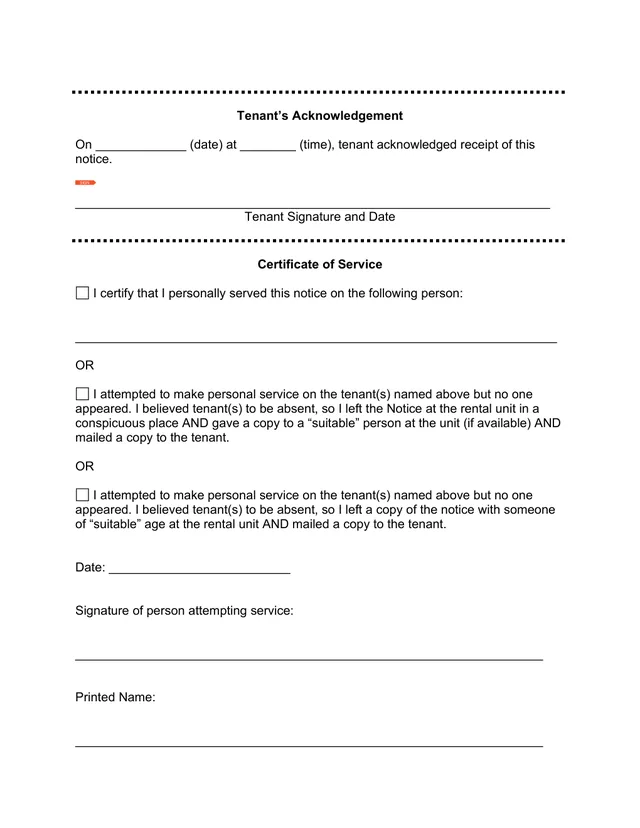
Tenant’s Acknowledgement
On _
(date) at
(time), tenant acknowledged receipt of this notice.
Tenant Signature and Date
Certificate of Service
I certify that I personally served this notice on the following person:
OR
I attempted to make personal service on the tenant(s) named above but no one appeared. I believed tenant(s) to be absent, so I left the Notice at the rental unit in a conspicuous place AND gave a copy to a “suitable” person at the unit (if available) AND mailed a copy to the tenant.
OR
I attempted to make personal service on the tenant(s) named above but no
How to fill it
Fill or edit this form in MePDF
- Preview page 2 to confirm the form name and revision.
- Select Fill form to answer the form one page at a time.
- Type an answer for each field; checkboxes and choices use the form’s own options.
- Preview the finished pages, then download the flattened PDF.
- The downloaded copy is image-only, so it cannot be edited as a form again.
Fill only the fields that apply and do not change clauses you were not asked to change. The editor keeps the original layout while you fill the existing fields.