What's inside
Form content
1
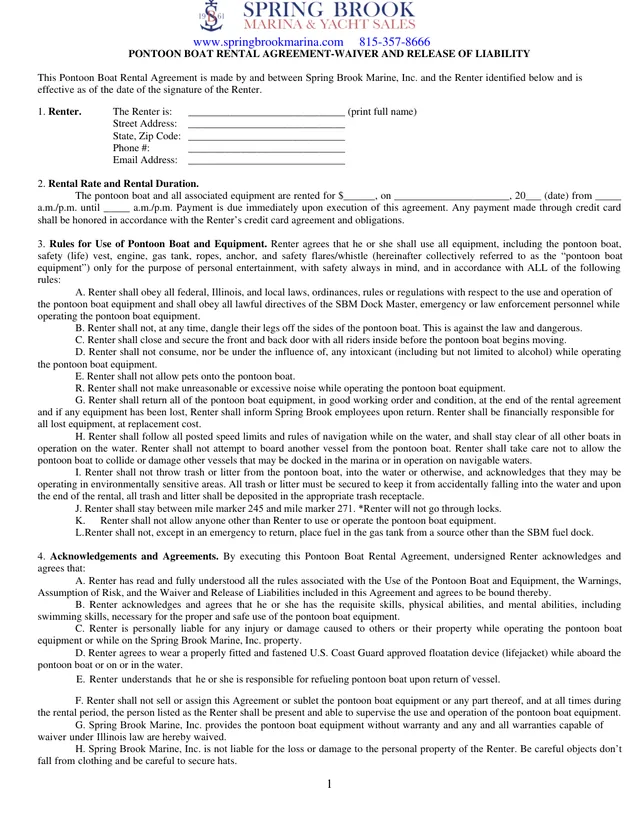
PONTOON BOAT RENTAL AGREEMENT-WAIVER AND RELEASE OF LIABILITY
This Pontoon Boat Rental Agreement is made by and between Spring Brook Marine, Inc. and the Renter identified below and is effective as of the date of the signature of the Renter.
1. Renter.
The Renter is:
______________________________ (print full name)
Street Address: ______________________________
State, Zip Code: ______________________________
Phone #:
______________________________
Email Address: ______________________________
2. Rental Rate and Rental Duration.
The pontoon boat and all associated equipment are rented for $______, on ______________________, 20___ (date) from _____ a.m./p.m. until _____ a.m./p.m. Payment is due immediately upon execution of this agreement. Any payment made through credit card shall be honored in accordance with the Renter’s credit card agreement and obligations.
3. Rules for Use of Pontoon Boat and Equipment. Renter agrees that he or she shall use all equipment, including the pontoon boat, safety (life) vest, engine, gas tank, ropes, anchor, and safety flares/whistle (hereinafter collectively referred to as the “pontoon boat equipment”) only for the purpose of personal entertainmen
How to fill it
Fill or edit this form in MePDF
- Preview page 1 to confirm the form name and revision.
- Select Fill form to answer the form one page at a time.
- Type an answer for each field; checkboxes and choices use the form’s own options.
- Preview the finished pages, then download the flattened PDF.
- The downloaded copy is image-only, so it cannot be edited as a form again.
Confirm the property address and the parties' legal names. The editor keeps the original layout while you fill the existing fields.