What's inside
Form content
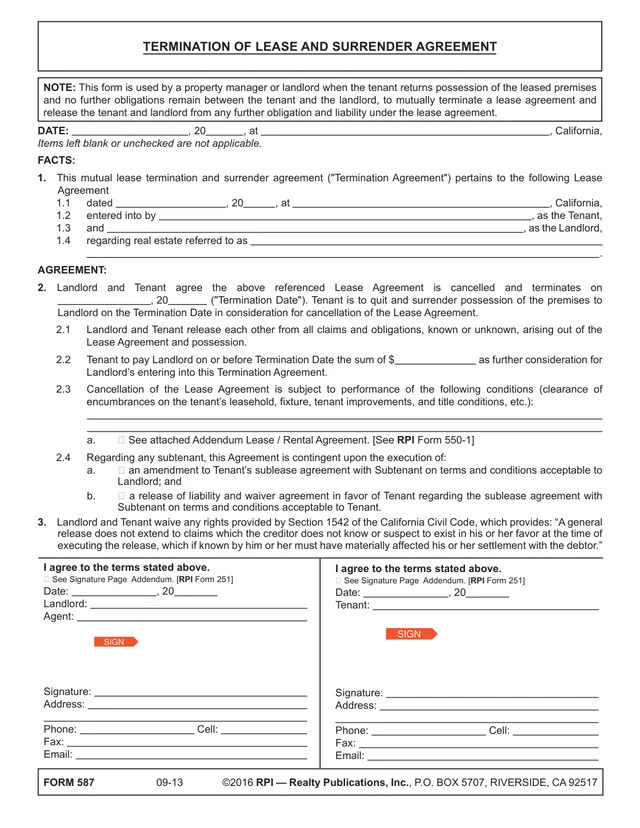
TERMINATION OF LEASE AND SURRENDER AGREEMENT
NOTE: This form is used by a property manager or landlord when the tenant returns possession of the leased premises and no further obligations remain between the tenant and the landlord, to mutually terminate a lease agreement and release the tenant and landlord from any further obligation and liability under the lease agreement.
DATE:
, 20
, at
, California,
Items left blank or unchecked are not applicable.
FACTS:
1. This mutual lease termination and surrender agreement ("Termination Agreement") pertains to the following Lease
Agreement
1.1 dated
, 20
, at
, California,
1.2 entered into by
, as the Tenant,
1.3 and
, as the Landlord,
1.4 regarding real estate referred to as
.
AGREEMENT:
2. Landlord and Tenant agree the above referenced Lease Agreement is cancelled and terminates on
, 20
("Termination Date"). Tenant is to quit and surrender possession of the premises to
Landlord on the Termination Date in consideration for cancellation of the Lease Agreement.
2.1 Landlord and Tenant release each other from all claims and obligations, known or unknown, arising out of the
Lease Agreement and possession.
2.2 Tenant to pay Landlord on
How to fill it
Fill or edit this form in MePDF
- Preview page 1 to confirm the form name and revision.
- Select Fill form to answer the form one page at a time.
- Type an answer for each field; checkboxes and choices use the form’s own options.
- Preview the finished pages, then download the flattened PDF.
- The downloaded copy is image-only, so it cannot be edited as a form again.
Confirm the property address and the parties' legal names. The editor keeps the original layout while you fill the existing fields.