What's inside
Form content
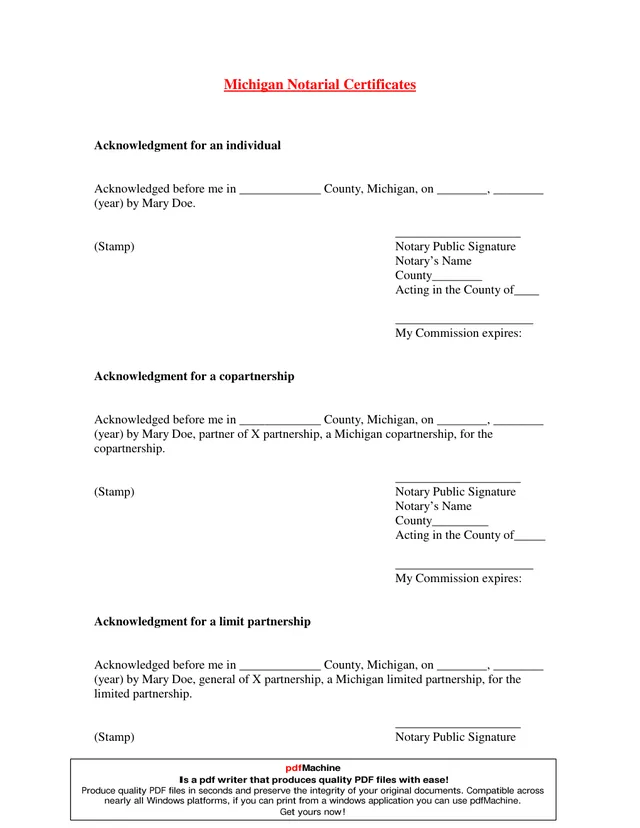
Michigan Notarial Certificates
Acknowledgment for an individual
Acknowledged before me in _____________ County, Michigan, on ________, ________
(year) by Mary Doe.
____________________
(Stamp)
Notary Public Signature
Notary’s Name
County________
Acting in the County of____
______________________
My Commission expires:
Acknowledgment for a copartnership
Acknowledged before me in _____________ County, Michigan, on ________, ________
(year) by Mary Doe, partner of X partnership, a Michigan copartnership, for the copartnership.
____________________
(Stamp)
Notary Public Signature
Notary’s Name
County_________
Acting in the County of_____
______________________
My Commission expires:
Acknowledgment for a limit partnership
Acknowledged before me in _____________ County, Michigan, on ________, ________
(year) by Mary Doe, general of X partnership, a Michigan limited partnership, for the limited partnership.
____________________
(Stamp)
Notary Public Signature pdfMachine
Is a pdf writer that produces quality PDF files with ease!
Produce quality PDF files in seconds and preserve the integrity of your original documents. Compatible across nearly all Windows platforms, if you can print from a
How to fill it
Fill or edit this form in MePDF
- Preview page 1 to confirm the form name and revision.
- This PDF has no interactive fields, so the fill wizard cannot ask for answers.
- Use the page preview to check the form, then download or print it from the issuing agency.
Fill only the fields that apply and do not change clauses you were not asked to change. Add only the fields the form needs, then flatten the copy when you export.