What's inside
Form content
Page 1
MICHIGAN
STATUTORY FORM POWER OF ATTORNEY
IMPORTANT INFORMATION
This power of attorney authorizes another person (your agent) to make decisions concerning your property for you (the principal). It is, therefore, an important legal document, and you are taking a serious step if you decide to make use of this form without seeking legal advice; for if the person you designate as your agent accepts authority granted under this power of attorney, the agent will be able to make decisions and act with respect to your property (including your money). The extent of your agent's authority over subjects listed on this form is explained in the uniform power of attorney act, MCL 556.201 to 556.505.
This power of attorney does not authorize the agent to make health care decisions for you and it does not authorize the agent to exercise powers you have as a parent or guardian regarding care, custody, or property of a minor child or ward.
You should select someone you trust to serve as your agent and you should ask yourself as you review each section of this form, whether you have chosen the right person(s) to act in that capacity. If your signature on this form is notarized or witnessed as
How to fill it
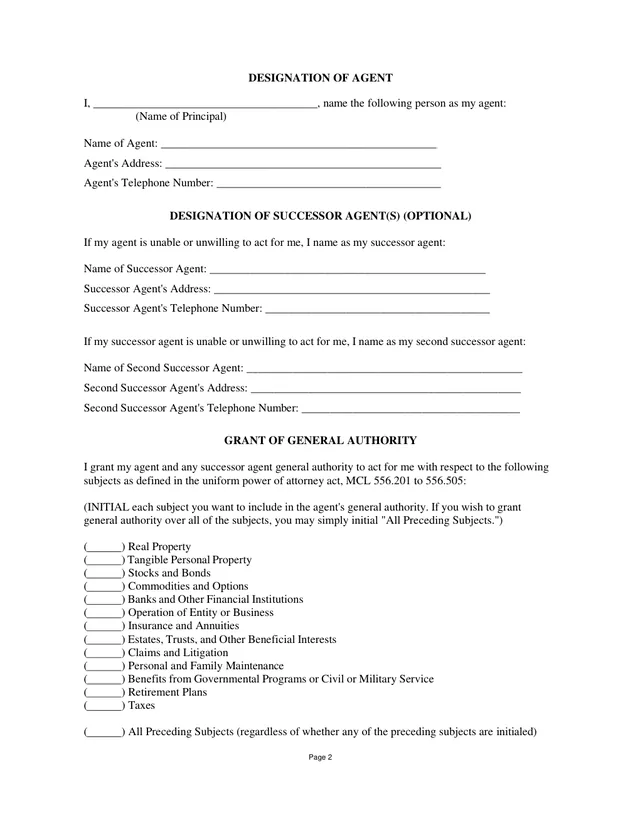
Fill or edit this form in MePDF
- Preview page 2 to confirm the form name and revision.
- Select Fill form to answer the form one page at a time.
- Type an answer for each field; checkboxes and choices use the form’s own options.
- Preview the finished pages, then download the flattened PDF.
- The downloaded copy is image-only, so it cannot be edited as a form again.
Fill only the fields that apply and do not change clauses you were not asked to change. The editor keeps the original layout while you fill the existing fields.