What's inside
Form content
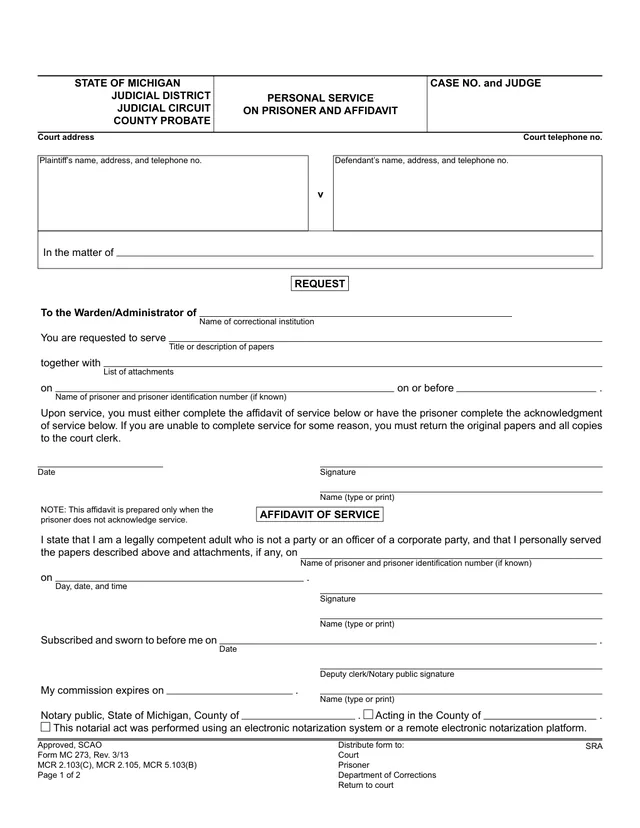
PERSONAL SERVICE
ON PRISONER AND AFFIDAVIT
STATE OF MICHIGAN
JUDICIAL DISTRICT
JUDICIAL CIRCUIT
COUNTY PROBATE
CASE NO. and JUDGE
Court address
Court telephone no.
Plaintiff’s name, address, and telephone no.
v
Defendant’s name, address, and telephone no.
In the matter of
REQUEST
To the Warden/Administrator of
Name of correctional institution
You are requested to serve
Title or description of papers together with
List of attachments on
Name of prisoner and prisoner identification number (if known) on or before
.
Upon service, you must either complete the affidavit of service below or have the prisoner complete the acknowledgment of service below. If you are unable to complete service for some reason, you must return the original papers and all copies to the court clerk.
Date
Signature
Name (type or print)
NOTE: This affidavit is prepared only when the prisoner does not acknowledge service.
AFFIDAVIT OF SERVICE
I state that I am a legally competent adult who is not a party or an officer of a corporate party, and that I personally served the papers described above and attachments, if any, on
Name of prisoner and prisoner identification number (if known) on
Day, date, and time
.
Signa
How to fill it
Fill or edit this form in MePDF
- Preview page 1 to confirm the form name and revision.
- Select Fill form to answer the form one page at a time.
- Type an answer for each field; checkboxes and choices use the form’s own options.
- Preview the finished pages, then download the flattened PDF.
- The downloaded copy is image-only, so it cannot be edited as a form again.
Fill only the fields that apply and do not change clauses you were not asked to change. The editor keeps the original layout while you fill the existing fields.