What's inside
Form content
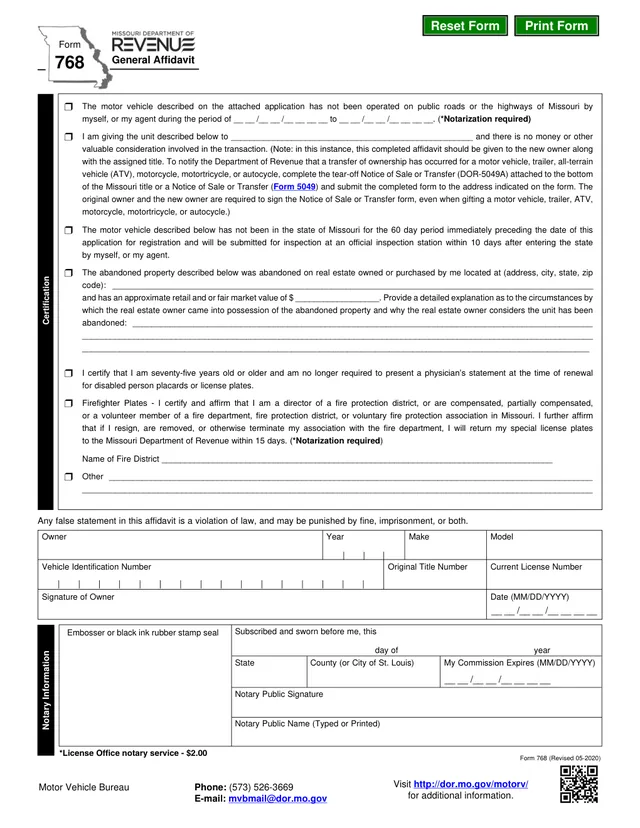
Form 768 (Revised 05-2020)
Motor Vehicle Bureau
Phone: (573) 526-3669
E-mail: [email protected]
Visit http://dor.mo.gov/motorv/ for additional information.
Certification r
The motor vehicle described on the attached application has not been operated on public roads or the highways of Missouri by myself, or my agent during the period of __ __ /__ __ /__ __ __ __ to __ __ /__ __ /__ __ __ __. (*Notarization required) r
I am giving the unit described below to ____________________________________________________ and there is no money or other valuable consideration involved in the transaction. (Note: in this instance, this completed affidavit should be given to the new owner along with the assigned title. To notify the Department of Revenue that a transfer of ownership has occurred for a motor vehicle, trailer, all-terrain vehicle (ATV), motorcycle, motortricycle, or autocycle, complete the tear-off Notice of Sale or Transfer (DOR-5049A) attached to the bottom of the Missouri title or a Notice of Sale or Transfer (Form 5049) and submit the completed form to the address indicated on the form. The original owner and the new owner are required to sign the Notice of Sale or Transfer form,
How to fill it
Fill or edit this form in MePDF
- Preview page 1 to confirm the form name and revision.
- Select Fill form to answer the form one page at a time.
- Type an answer for each field; checkboxes and choices use the form’s own options.
- Preview the finished pages, then download the flattened PDF.
- The downloaded copy is image-only, so it cannot be edited as a form again.
Fill only the fields that apply and do not change clauses you were not asked to change. The editor keeps the original layout while you fill the existing fields.