What's inside
Form content
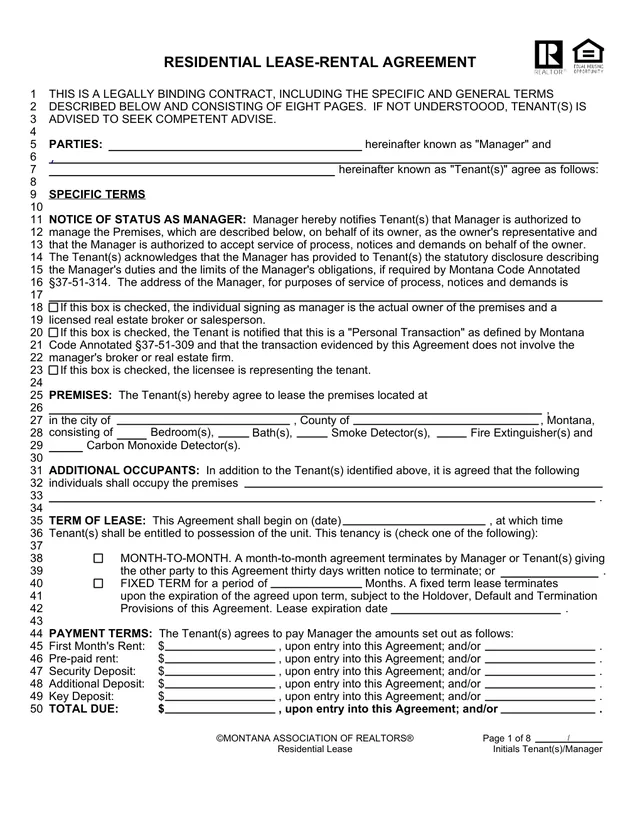
RESIDENTIAL LEASE-RENTAL AGREEMENT
THIS IS A LEGALLY BINDING CONTRACT, INCLUDING THE SPECIFIC AND GENERAL TERMS
DESCRIBED BELOW AND CONSISTING OF EIGHT PAGES. IF NOT UNDERSTOOOD, TENANT(S) IS
ADVISED TO SEEK COMPETENT ADVISE.
1
PARTIES:
hereinafter known as "Manager" and hereinafter known as "Tenant(s)" agree as follows:
SPECIFIC TERMS
PREMISES: The Tenant(s) hereby agree to lease the premises located at
, County of
Bath(s),
Smoke Detector(s),
ADDITIONAL OCCUPANTS: In addition to the Tenant(s) identified above, it is agreed that the following individuals shall occupy the premises
.
TERM OF LEASE: This Agreement shall begin on (date)
Tenant(s) shall be entitled to possession of the unit. This tenancy is (check one of the following):
MONTH-TO-MONTH. A month-to-month agreement terminates by Manager or Tenant(s) giving the other party to this Agreement thirty days written notice to terminate; or
FIXED TERM for a period of
Months. A fixed term lease terminates upon the expiration of the agreed upon term, subject to the Holdover, Default and Termination
Provisions of this Agreement. Lease expiration date
PAYMENT TERMS: The Tenant(s) agrees to pay Manager the amounts set out as follows:
F
How to fill it
Fill or edit this form in MePDF
- Preview page 1 to confirm the form name and revision.
- Select Fill form to answer the form one page at a time.
- Type an answer for each field; checkboxes and choices use the form’s own options.
- Preview the finished pages, then download the flattened PDF.
- The downloaded copy is image-only, so it cannot be edited as a form again.
Confirm the property address and the parties' legal names. The editor keeps the original layout while you fill the existing fields.