What's inside
Form content
STATE OF NORTH CAROLINA ) IN THE DISTRICT COURT
) SS
COUNTY OF _________________ )
) _________________ JUDICIAL DISTRICT
)
_________________, ) Civil Case No. _______________________
Plaintiff, )
) vs. ) DIVORCE SETTLEMENT AGREEMENT
)
)
_________________, )
Defendant, )
MARITAL SEPARATION AGREEMENT
I. THE PARTIES. This Marital Settlement Agreement (“Agreement”) made this
________________, 20____, is an agreement to dissolve the marriage between:
HUSBAND: ____________________________, (“Husband”)
AND
WIFE: ____________________________, (“Wife”).
The terms "Husband" and "Wife" have no correlation to the person's gender and are solely used to identify the individual to the local court. When mentioned in a singular version, "Husband" and "Wife," shall be known as a "Spouse," and when mentioned together, the Husband and Wife shall be known as the "Couple."
II. THE MARRIAGE. The Couple was married on ________________, 20____, in the
City of ________________, State of ________________.
III. ARMED FORCES. The following are current members of the Armed Forces: (check one)
☐ - None of the Spouses
☐ - Husband
☐ - Wife
☐ - Both Spouses
IV. DATE OF SEPARATION. The date of separation of the Coup
How to fill it
Fill or edit this form in MePDF
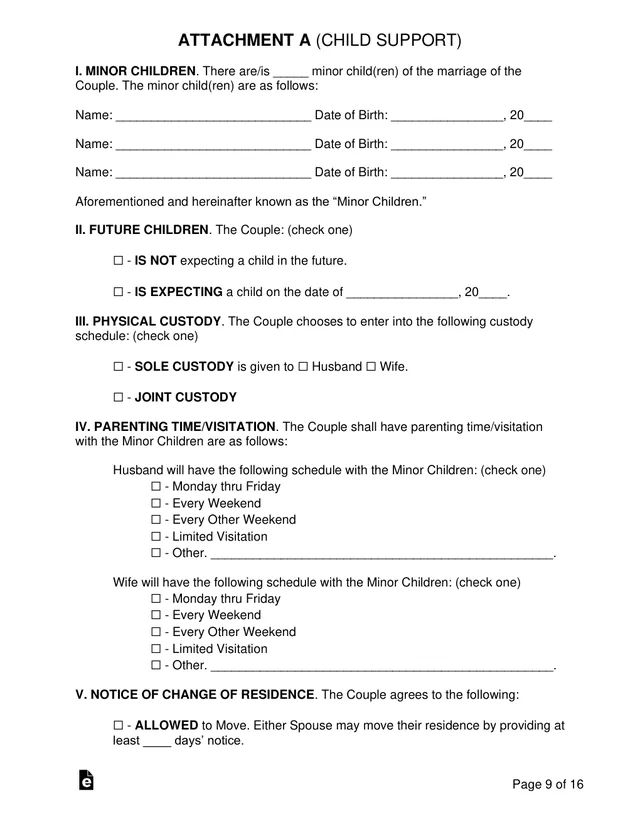
- Preview page 9 to confirm the form name and revision.
- Select Fill form to answer the form one page at a time.
- Type an answer for each field; checkboxes and choices use the form’s own options.
- Preview the finished pages, then download the flattened PDF.
- The downloaded copy is image-only, so it cannot be edited as a form again.
Fill only the fields that apply and do not change clauses you were not asked to change. The editor keeps the original layout while you fill the existing fields.