What's inside
Form content
2019-06 Form P
Residential Tenancies Program 1-800-670-4357 www.novascotia.ca/rta
G1
What are these forms for?
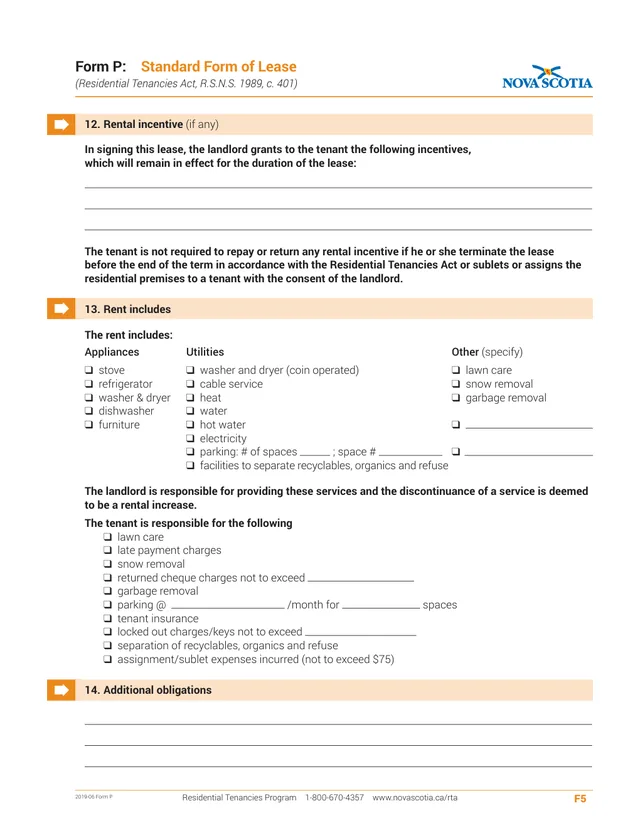
Use these forms to show the terms that must be part of any lease signed in Nova Scotia. The lease a landlord uses may look different, but must contain all the items shown here. If any of the items are not part of the lease a tenant signs, they apply anyway.
A landlord may attach a schedule or appendix showing rules for the property. The rules must
• apply to all tenants equally
• help to ensure services and facilities are equally available to all tenants
OR
• help to keep the building and its occupants safe and free of damage
Both the tenant and the landlord must have a copy of the signed lease. The landlord must give the tenant a copy within 10 days of signing.
How to complete this form?
Parties
This section identifies who is signing the lease. It is important to have this information in case one of the parties needs to make an Application to Director later. Fill it out as completely as possible.
Occupants
All adults who will be living in a rental unit should sign the lease as tenants. In some cases, the tenant may wish to have someone live with them who will not be respo
How to fill it
Fill or edit this form in MePDF
- Preview page 10 to confirm the form name and revision.
- Select Fill form to answer the form one page at a time.
- Type an answer for each field; checkboxes and choices use the form’s own options.
- Preview the finished pages, then download the flattened PDF.
- The downloaded copy is image-only, so it cannot be edited as a form again.
Confirm the property address and the parties' legal names. The editor keeps the original layout while you fill the existing fields.