What's inside
Form content
© 2021 – Civil Law Self-Help Center, Rev. 7/28/2021
For the Tenant Affidavit form and for more information, visit www.civillawselfhelpcenter.org.
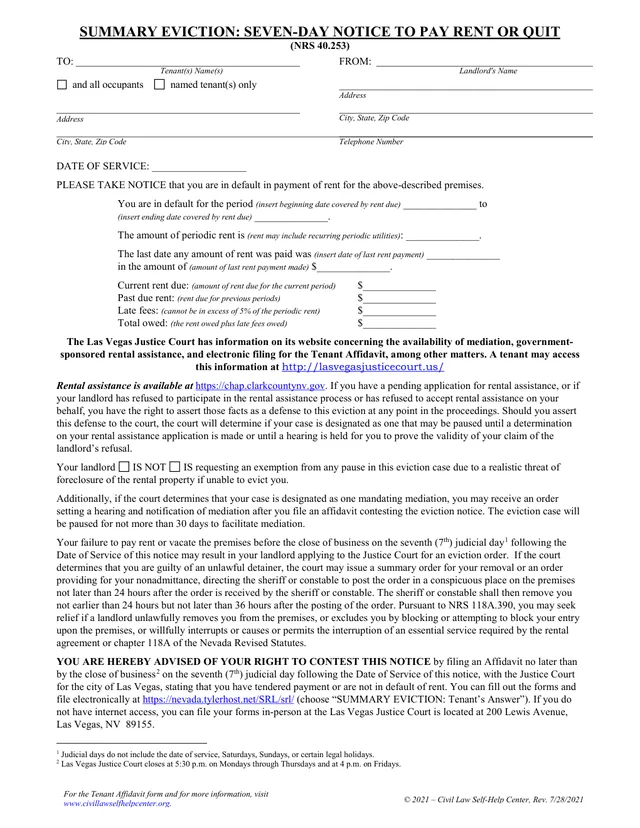
SUMMARY EVICTION: SEVEN-DAY NOTICE TO PAY RENT OR QUIT
(NRS 40.253)
TO:
FROM:
Tenant(s) Name(s)
Landlord's Name and all occupants named tenant(s) only
Address
Address
City, State, Zip Code
City, State, Zip Code
DATE OF SERVICE: __________________
Telephone Number
PLEASE TAKE NOTICE that you are in default in payment of rent for the above-described premises.
You are in default for the period (insert beginning date covered by rent due) ______________ to
(insert ending date covered by rent due) ______________.
The amount of periodic rent is (rent may include recurring periodic utilities): ______________.
The last date any amount of rent was paid was (insert date of last rent payment) ______________ in the amount of (amount of last rent payment made) $______________.
Current rent due: (amount of rent due for the current period)
$______________
Past due rent: (rent due for previous periods)
$______________
Late fees: (cannot be in excess of 5% of the periodic rent)
$______________
Total owed: (the rent owed plus late fees owed)
$______________
How to fill it
Fill or edit this form in MePDF
- Preview page 1 to confirm the form name and revision.
- Select Fill form to answer the form one page at a time.
- Type an answer for each field; checkboxes and choices use the form’s own options.
- Preview the finished pages, then download the flattened PDF.
- The downloaded copy is image-only, so it cannot be edited as a form again.
Fill only the fields that apply and do not change clauses you were not asked to change. The editor keeps the original layout while you fill the existing fields.