What's inside
Form content
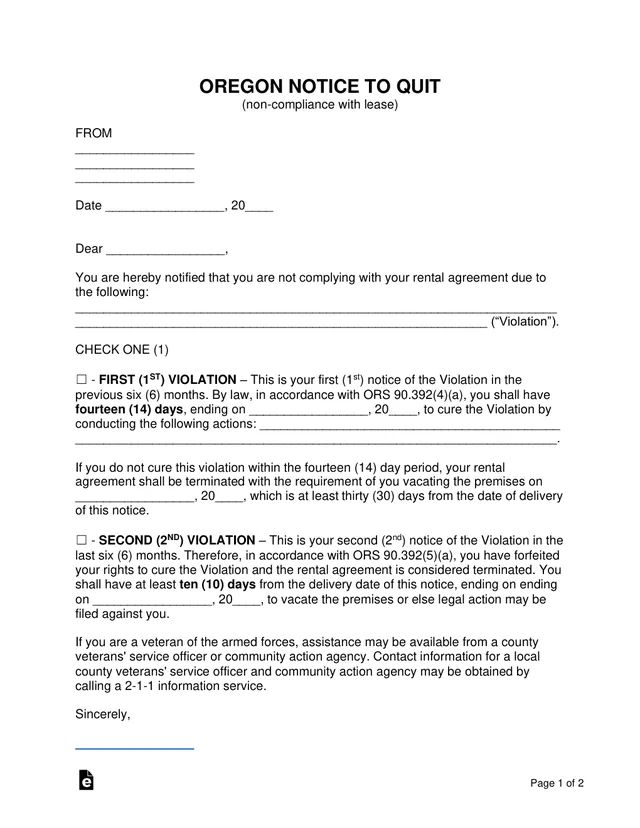
OREGON NOTICE TO QUIT
(non-compliance with lease)
FROM
_________________
_________________
_________________
Date _________________, 20____
Dear _________________,
You are hereby notified that you are not complying with your rental agreement due to the following:
_____________________________________________________________________
___________________________________________________________ (“Violation”).
CHECK ONE (1)
☐ - FIRST (1ST) VIOLATION – This is your first (1st) notice of the Violation in the previous six (6) months. By law, in accordance with ORS 90.392(4)(a), you shall have fourteen (14) days, ending on _________________, 20____, to cure the Violation by conducting the following actions: ___________________________________________
_____________________________________________________________________.
If you do not cure this violation within the fourteen (14) day period, your rental agreement shall be terminated with the requirement of you vacating the premises on
_________________, 20____, which is at least thirty (30) days from the date of delivery of this notice.
☐ - SECOND (2ND) VIOLATION – This is your second (2nd) notice of the Violation in the last six (6) months.
How to fill it
Fill or edit this form in MePDF
- Preview page 1 to confirm the form name and revision.
- Select Fill form to answer the form one page at a time.
- Type an answer for each field; checkboxes and choices use the form’s own options.
- Preview the finished pages, then download the flattened PDF.
- The downloaded copy is image-only, so it cannot be edited as a form again.
Fill only the fields that apply and do not change clauses you were not asked to change. The editor keeps the original layout while you fill the existing fields.