What's inside
Form content
Affidavit of
Personal Service
Service Form 2
Service Form 2
Personal Service Instructions
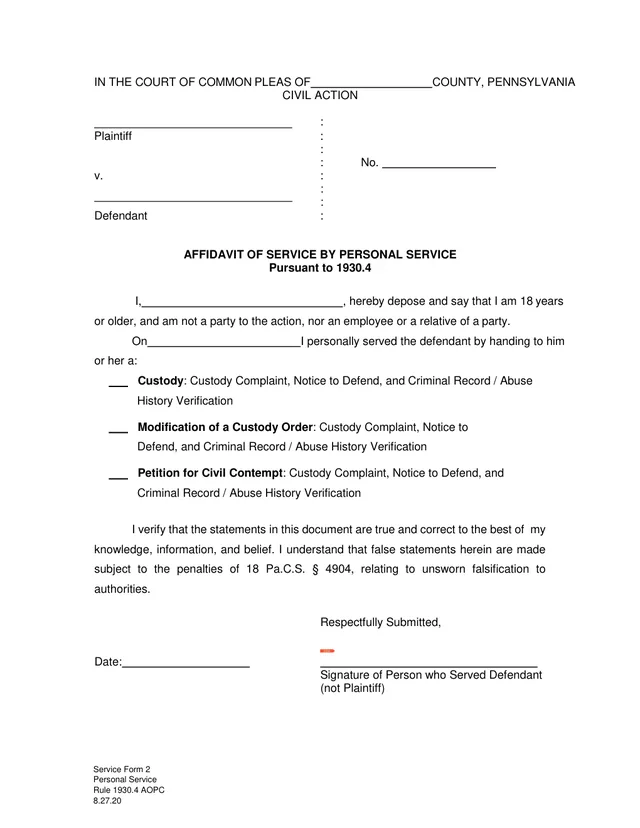
Affidavit of Personal Service
The numbers on these instructions correspond with the numbers in the boxes on the form. Use the form with the boxes to guide you through filling out the blank form.
Box 1. Type the name of the county in which you filed.
Box 2: Type your name exactly as you wrote it on the Complaint.
Box 3. Type the docket number assigned by the office where legal pleadings are filed.
Box 4: Type the name of the Defendant exactly as it appears on the Complaint.
Box 5: Type the name of the person who is serving the court papers.
Pa. R.C.P. 76 “Competent Adult.”
Box 6: Type the date the papers were given to the Defendant.
Box 7: Place a check on the line that applies.
THE PERSON SERVING THE PAPERS MUST COMPLETE THE FORM.
HE OR SHE MUST READ THE STATEMENT BEFORE SIGNING.
Box 8: Type date signed.
Box 9: The person who served the Defendant must sign his or her name.
File this form in the office where legal pleadings are filed.
How to fill it
Fill or edit this form in MePDF
- Preview page 4 to confirm the form name and revision.
- Select Fill form to answer the form one page at a time.
- Type an answer for each field; checkboxes and choices use the form’s own options.
- Preview the finished pages, then download the flattened PDF.
- The downloaded copy is image-only, so it cannot be edited as a form again.
Fill only the fields that apply and do not change clauses you were not asked to change. The editor keeps the original layout while you fill the existing fields.