What's inside
Form content
Buyer’s Initials _______ - _______ Seller’s Initials _______ - _______
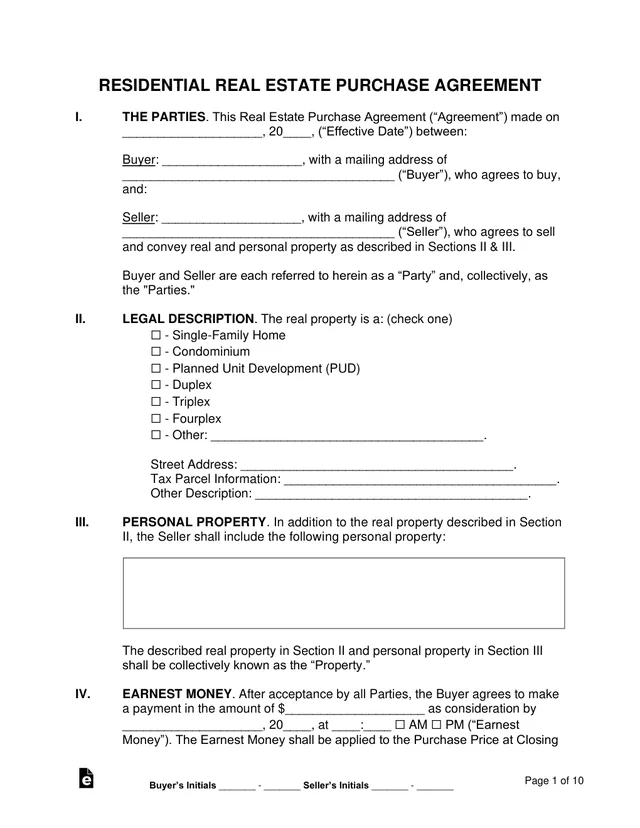
RESIDENTIAL REAL ESTATE PURCHASE AGREEMENT
I.
THE PARTIES. This Real Estate Purchase Agreement (“Agreement”) made on
____________________, 20____, (“Effective Date”) between:
Buyer: ____________________, with a mailing address of
_______________________________________ (“Buyer”), who agrees to buy, and:
Seller: ____________________, with a mailing address of
_______________________________________ (“Seller”), who agrees to sell and convey real and personal property as described in Sections II & III.
Buyer and Seller are each referred to herein as a “Party” and, collectively, as the "Parties."
II.
LEGAL DESCRIPTION. The real property is a: (check one)
☐ - Single-Family Home
☐ - Condominium
☐ - Planned Unit Development (PUD)
☐ - Duplex
☐ - Triplex
☐ - Fourplex
☐ - Other: _______________________________________.
Street Address: _______________________________________.
Tax Parcel Information: _______________________________________.
Other Description: _______________________________________.
III.
PERSONAL PROPERTY. In addition to the real property described in Section
II, the Seller shall include the following perso
How to fill it
Fill or edit this form in MePDF
- Preview page 1 to confirm the form name and revision.
- Select Fill form to answer the form one page at a time.
- Type an answer for each field; checkboxes and choices use the form’s own options.
- Preview the finished pages, then download the flattened PDF.
- The downloaded copy is image-only, so it cannot be edited as a form again.
Confirm the property address and the parties' legal names. The editor keeps the original layout while you fill the existing fields.