What's inside
Form content
UNCONTESTED DIVORCE WITH MINOR CHILDREN
This forms packet is designed to guide you in the preparation of your divorce papers. You must fill in the required information as it applies to your situation. Your papers should remain in the same order as they appear in this packet. If you do not have access to a typewriter, you may fill in the blanks by hand, in neat print, using BLACK ink.
You should fill in every blank line EXCEPT for the civil action file number blanks and the lines provided for signatures by the Notary Public and the Judge.
In the Complaint and the Settlement Agreement, there are some sections that have two possible answers, separated by an [OR]. In these sections, you must choose which of the two choices fits best in your situation, and then include only that choice in your documents. The other choice should be ignored, and should not be included in your documents.
Make sure that everything is signed. All signatures that require notarization must be notarized before your documents will be approved for filing.
Court Personnel are NOT allowed to answer any questions concerning the preparation of these forms. State Law O.C.G.A. §15-19-51 forbids court personnel to give
How to fill it
Fill or edit this form in MePDF
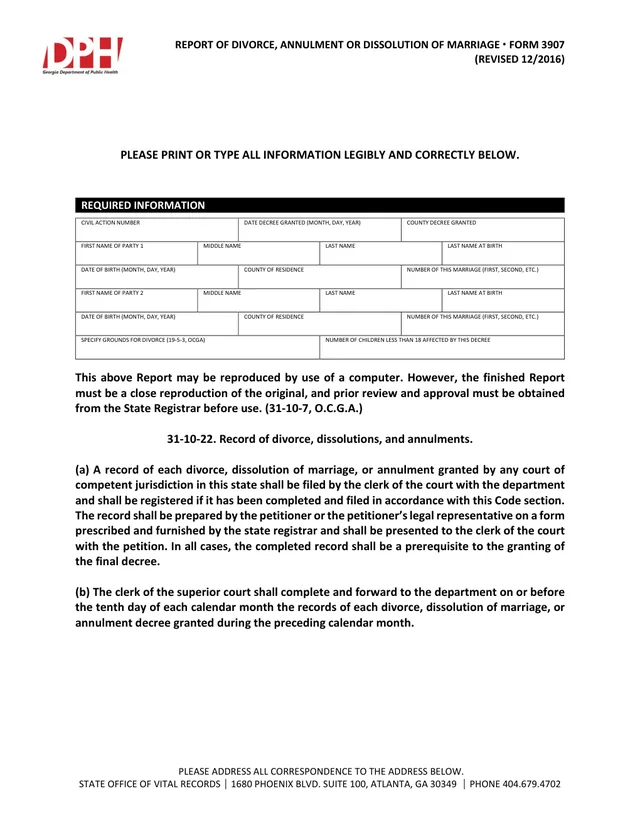
- Preview page 48 to confirm the form name and revision.
- Select Fill form to answer the form one page at a time.
- Type an answer for each field; checkboxes and choices use the form’s own options.
- Preview the finished pages, then download the flattened PDF.
- The downloaded copy is image-only, so it cannot be edited as a form again.
Fill only the fields that apply and do not change clauses you were not asked to change. The editor keeps the original layout while you fill the existing fields.