What's inside
Form content
This product does not constitute the rendering of legal advice or services. This product is intended for informational use only and is not a substitute for legal advice. State laws vary, so consult an attorney on all legal matters. This product was not prepared by a person licensed to practice law in this state.
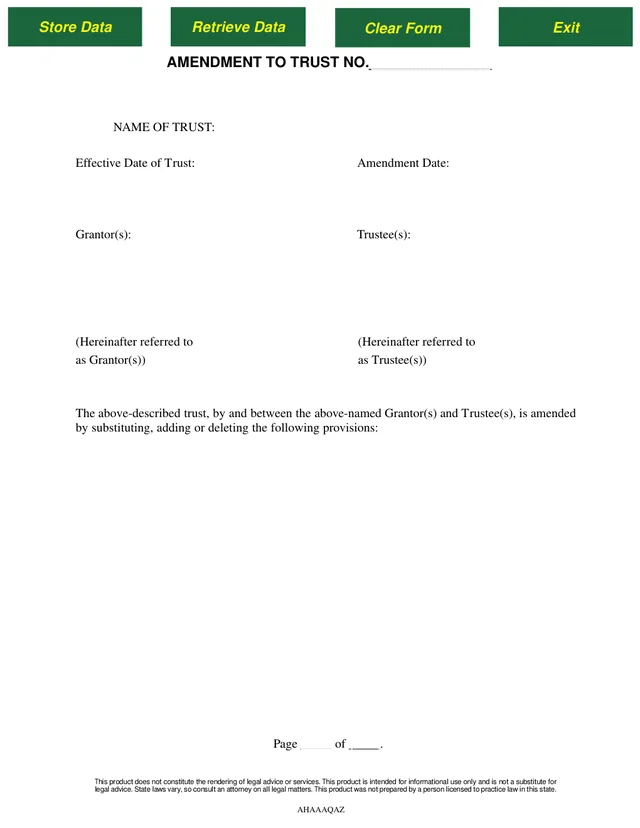
AMENDMENT TO TRUST NO._______________
NAME OF TRUST:
Effective Date of Trust:
Amendment Date:
Grantor(s):
Trustee(s):
(Hereinafter referred to
(Hereinafter referred to as Grantor(s)) as Trustee(s))
The above-described trust, by and between the above-named Grantor(s) and Trustee(s), is amended by substituting, adding or deleting the following provisions:
Page _____ of _____.
Store Data
Retrieve Data
Clear Form
Exit
AHAAAQAZ
This product does not constitute the rendering of legal advice or services. This product is intended for informational use only and is not a substitute for legal advice. State laws vary, so consult an attorney on all legal matters. This product was not prepared by a person licensed to practice law in this state.
All provisions of the above Trust are hereby incorporated by reference herein with the exception of the provisions expressly modified by this Ame
How to fill it
Fill or edit this form in MePDF
- Preview page 1 to confirm the form name and revision.
- Select Fill form to answer the form one page at a time.
- Type an answer for each field; checkboxes and choices use the form’s own options.
- Preview the finished pages, then download the flattened PDF.
- The downloaded copy is image-only, so it cannot be edited as a form again.
Fill only the fields that apply and do not change clauses you were not asked to change. The editor keeps the original layout while you fill the existing fields.