What's inside
Form content
WV Driver’s License Number
Photo ID Card Number
I,
,
.
in the facility hereby swear and affirm that I reside at the following West Virginia address:
SIGNATURE OF APPLICANT
DATE (MM/DD/YYYY)
304-926-3801 dmv.wv.gov
PO Box 17010 • Charleston, WV • 25317
DMV-AFR-22 Rev. 06/2022
West Virginia Department of Transportation
Division of Motor Vehicles
Affidavit of West Virginia Facility Residency
/
(X)
/
FULL NAME OF APPLICANT
FULL NAME OF FACILITY UNDER SECTION B
STREET ADDRESS
STREET ADDRESS
I,
, resides in the above mentioned facility at the following address:
SIGNATURE OF DESIGNATED STAFF MEMBER
DATE (MM/DD/YYYY)
/
(X)
/
DESIGNATED STAFF MEMBER OF FACILITY LISTED BELOW
FULL NAME OF APPLICANT
CITY
STATE
ZIP CODE
CITY
STATE
ZIP CODE
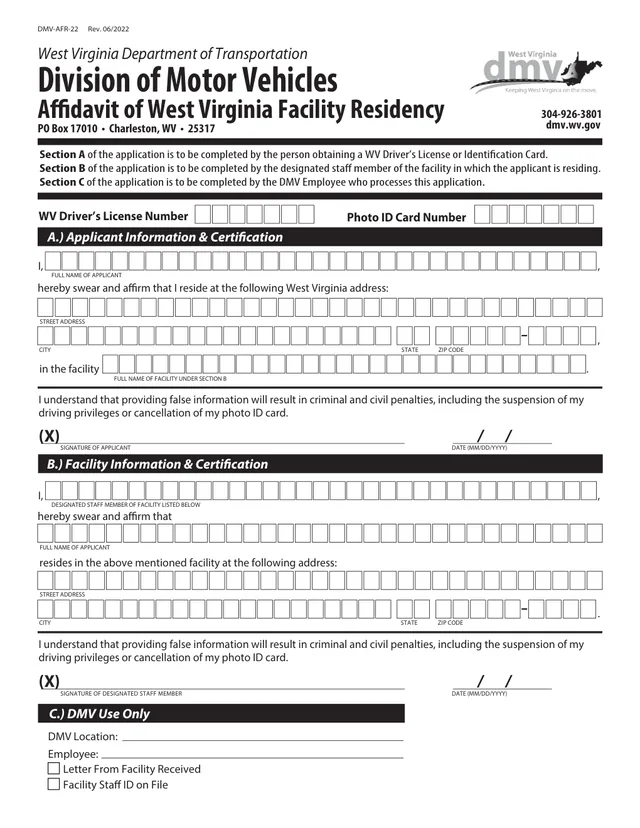
Section A of the application is to be completed by the person obtaining a WV Driver’s License or Identification Card.
Section B of the application is to be completed by the designated staff member of the facility in which the applicant is residing.
Section C of the application is to be completed by the DMV Employee who processes this application.
DMV Location:
Employee:
Letter From Facility Received
Facility Staff ID on File
C.) DMV Use Only
B.) Facility Information
How to fill it
Fill or edit this form in MePDF
- Preview page 1 to confirm the form name and revision.
- Select Fill form to answer the form one page at a time.
- Type an answer for each field; checkboxes and choices use the form’s own options.
- Preview the finished pages, then download the flattened PDF.
- The downloaded copy is image-only, so it cannot be edited as a form again.
Fill only the fields that apply and do not change clauses you were not asked to change. The editor keeps the original layout while you fill the existing fields.