What's inside
Form content
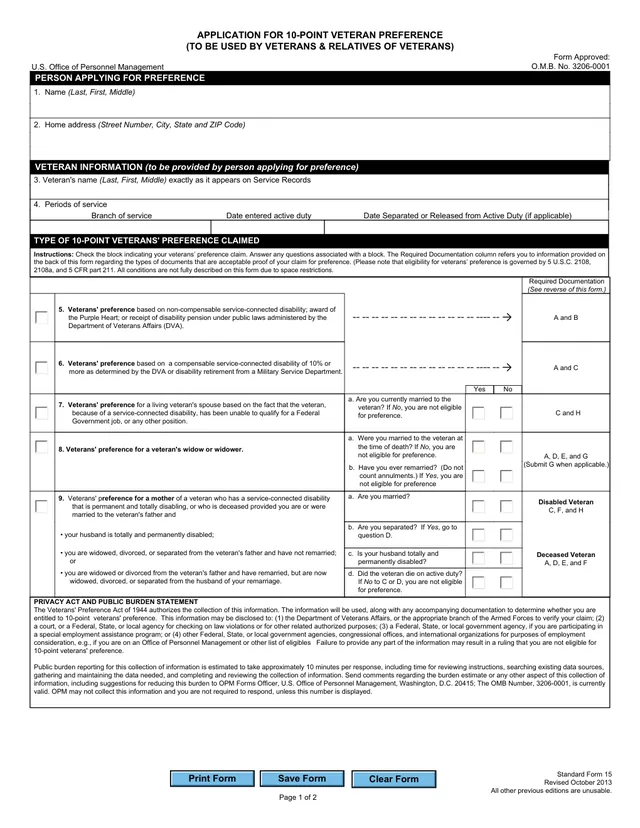
APPLICATION FOR 10-POINT VETERAN PREFERENCE
(TO BE USED BY VETERANS & RELATIVES OF VETERANS)
U.S. Office of Personnel Management
Form Approved:
O.M.B. No. 3206-0001
PERSON APPLYING FOR PREFERENCE
1. Name (Last, First, Middle)
2. Home address (Street Number, City, State and ZIP Code)
VETERAN INFORMATION (to be provided by person applying for preference)
3. Veteran's name (Last, First, Middle) exactly as it appears on Service Records
4. Periods of service
Branch of service
Date entered active duty
Date Separated or Released from Active Duty (if applicable)
TYPE OF 10-POINT VETERANS' PREFERENCE CLAIMED
Instructions: Check the block indicating your veterans’ preference claim. Answer any questions associated with a block. The Required Documentation column refers you to information provided on the back of this form regarding the types of documents that are acceptable proof of your claim for preference. (Please note that eligibility for veterans’ preference is governed by 5 U.S.C. 2108,
2108a, and 5 CFR part 211. All conditions are not fully described on this form due to space restrictions.
Required Documentation
(See reverse of this form.)
5. Veterans' preference based on non-compensable
How to fill it
Fill or edit this form in MePDF
- Preview page 1 to confirm the form name and revision.
- Select Fill form to answer the form one page at a time.
- Type an answer for each field; checkboxes and choices use the form’s own options.
- Preview the finished pages, then download the flattened PDF.
- The downloaded copy is image-only, so it cannot be edited as a form again.
Use the service member's full legal name and current unit details. The editor keeps the original layout while you fill the existing fields.